Containerizing ML Applications with Docker
Package the model, the exact scikit-learn version, and the API into one image that runs the same everywhere. Multi-stage builds, a lean non-root image, .dockerignore, and Docker Compose. Part 3 of the MLOps series.
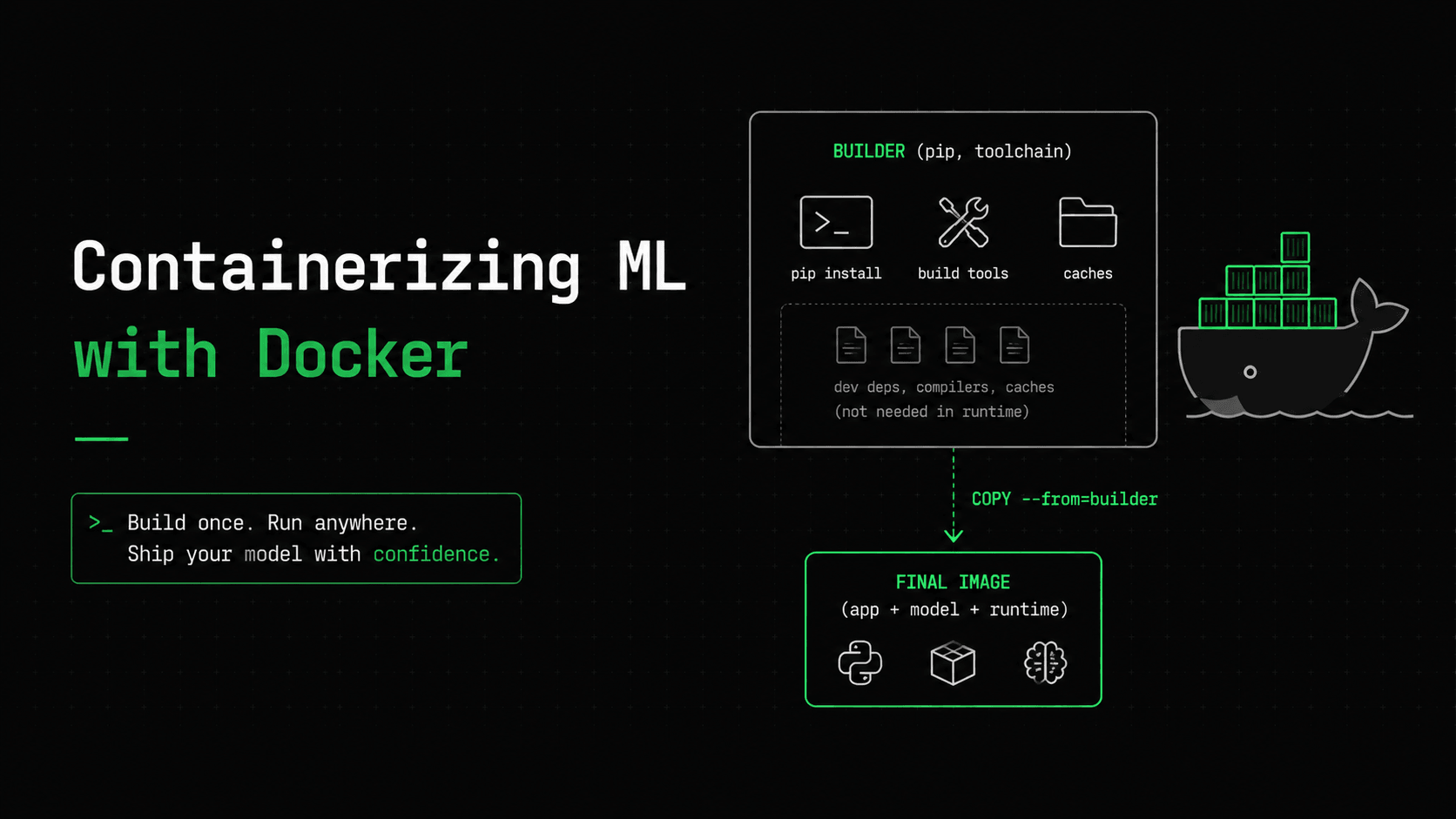
Part two ended with a confession: the API runs great on your machine. That's exactly the problem. "Runs on my machine" is where deployments go wrong, and for ML it's worse than usual, because the thing that breaks in production is rarely your code. It's the environment around it.
Remember the version-mismatch warning from part two? A model.joblib saved under scikit-learn 1.5 can crash, or silently misbehave, when loaded under 1.3. Your laptop has 1.5. The server has whatever someone pip-installed last year. That mismatch stays invisible until a prediction quietly goes wrong. Docker is how we make it impossible: we freeze the model, the exact sklearn version, the Python runtime, and the API into one image that runs the same on your laptop, in CI, and in production. (For truly byte-for-byte reproducible builds you would pin the base image by digest, like FROM python:3.10-slim@sha256:… — but pinning the tag plus freezing dependencies is already enough to kill the version-mismatch bug.)
If you've containerized a web app before, none of the Docker mechanics here are new. What's worth your attention is the handful of ML-specific decisions: what belongs in the image, what absolutely doesn't, and why the artifact and its runtime have to travel together.
What a container actually fixes for ML
The usual analogy says a container ships your app plus its whole environment. For ML, that idea is exactly right, and it matters more than usual. A model isn't self-contained: it's a pickle file that only loads correctly with the same library versions it was saved with. Shipping just the .joblib is like emailing someone a recipe and assuming they own the same oven, the same pans, and the same brand of flour. The container ships the whole kitchen. That's the difference between "should work" and "does work."
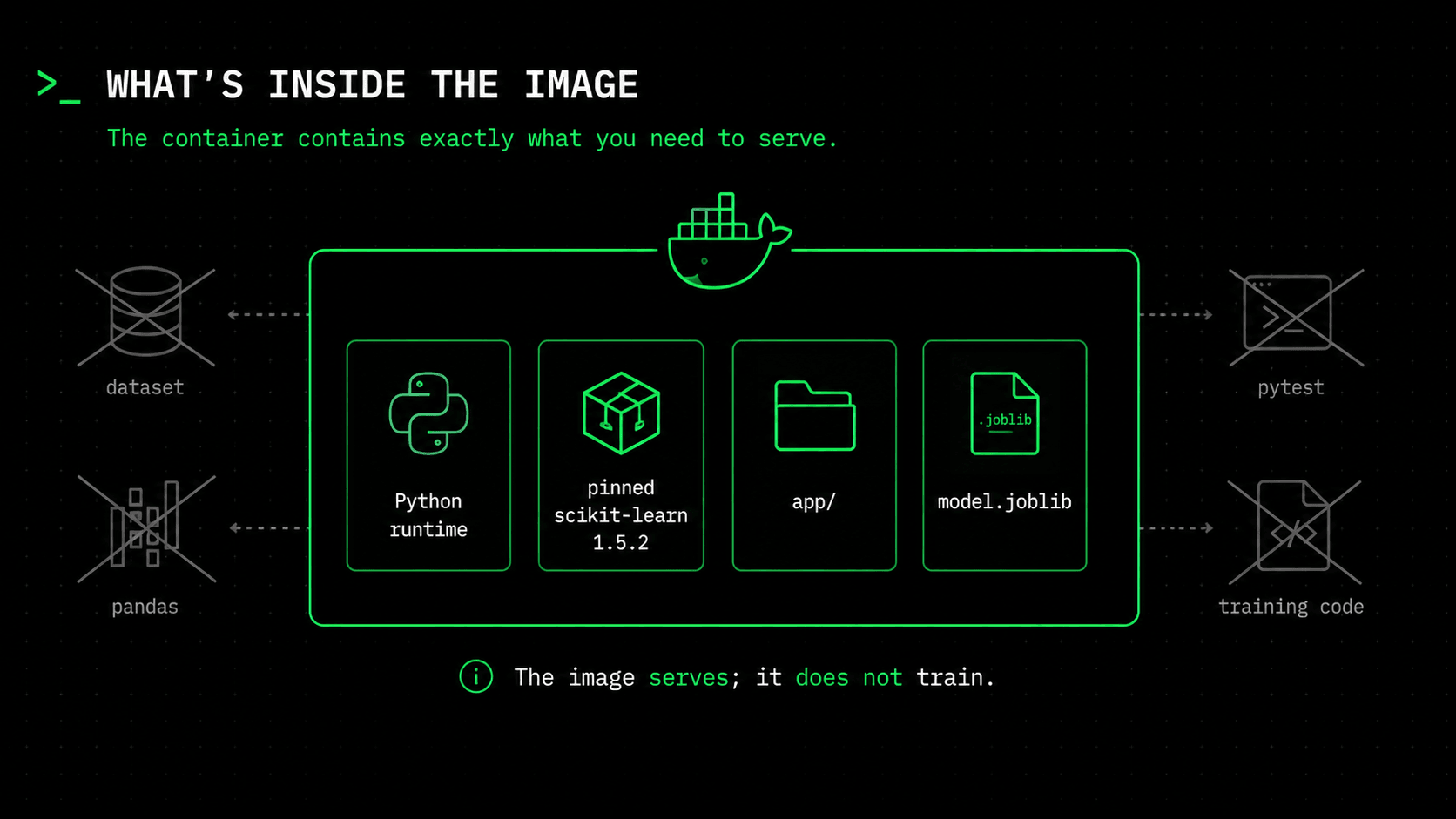
So the image will contain four things and nothing more: the Python runtime, the pinned runtime dependencies (scikit-learn included, because we need it to unpickle the model), our app/ package, and the model.joblib artifact. It will NOT contain the dataset, the training code, pandas, or pytest. The image serves; it doesn't train.
Multi-stage builds: build fat, ship thin
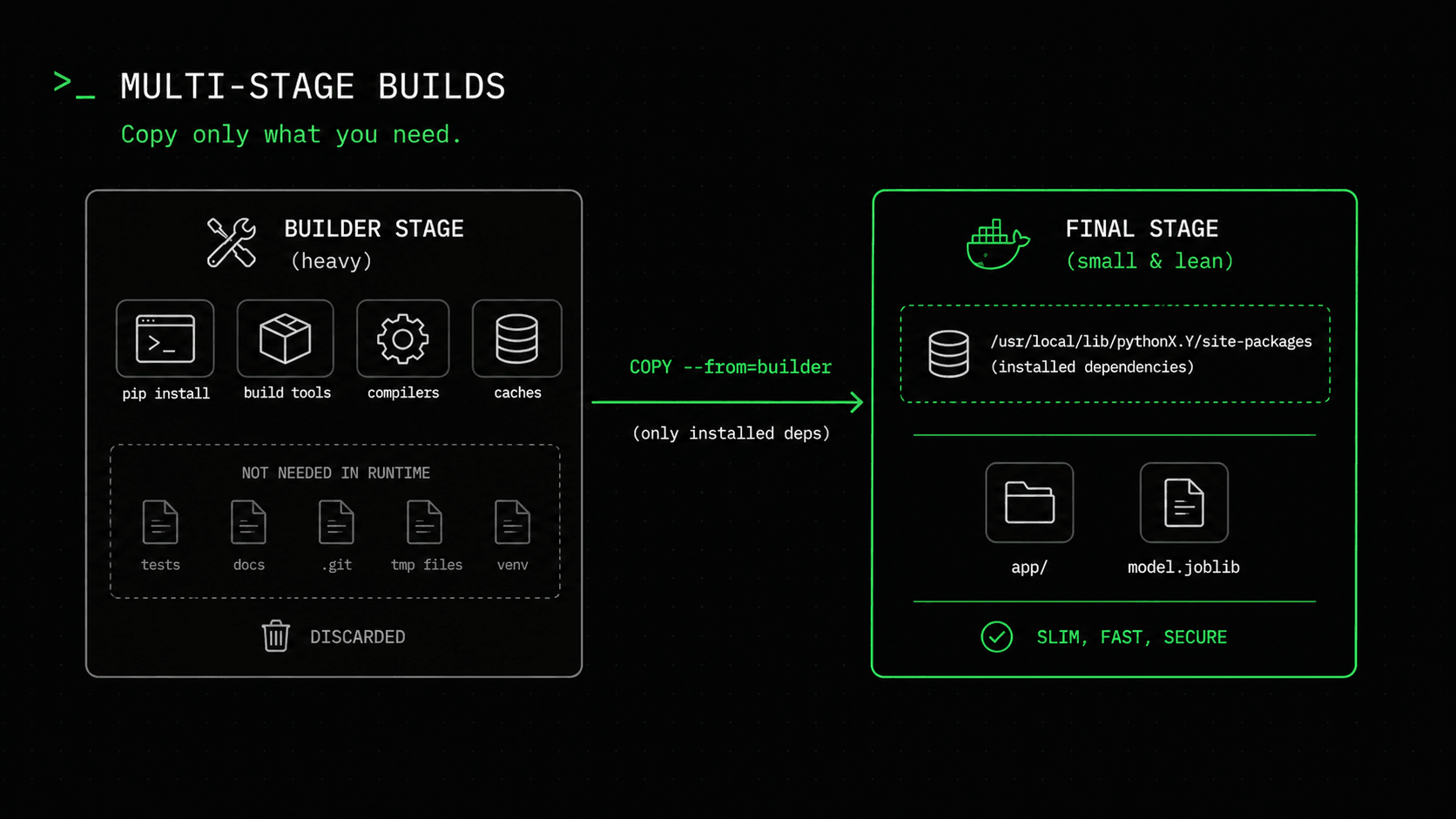
A naive Dockerfile installs everything into one image and ships all of it: pip, build tools, caches, everything. You end up shipping the workshop along with the finished furniture. Multi-stage builds fix that, and if you followed part one, you already know the shape: it's the training-vs-inference split again, in Docker form. The builder stage is like training — it pulls in the heavy toolchain to produce something. The final stage is like inference: it copies out only the result and throws the rest away.
# ---------- Stage 1: builder ----------
FROM python:3.10-slim AS builder
WORKDIR /build
ENV PIP_NO_CACHE_DIR=1

COPY requirements-serve.txt .
RUN pip install --prefix=/install -r requirements-serve.txt


# ---------- Stage 2: runtime ----------
FROM python:3.10-slim
WORKDIR /app
ENV PYTHONUNBUFFERED=1 PYTHONDONTWRITEBYTECODE=1

# Non-root: a container running as root is one bug away from a root shell on the node.
RUN useradd --create-home --uid 10001 appuser

COPY --from=builder /install /usr/local
COPY app/ ./app/
COPY model/ ./model/

USER appuser
EXPOSE 8000

HEALTHCHECK --interval=30s --timeout=3s --start-period=10s --retries=3 \
  CMD python -c "import urllib.request,sys; sys.exit(0 if urllib.request.urlopen('http://localhost:8000/health').status==200 else 1)"

CMD ["gunicorn", "app.main:app", "-k", "uvicorn.workers.UvicornWorker", "-w", "2", "-b", "0.0.0.0:8000"]
The builder stage installs our dependencies into a throwaway /install folder. The final stage copies that folder over and never sees pip's cache, the build tools, or the downloaded packages. The result is a much smaller image — most of what remains is scikit-learn's numpy/scipy stack, which is genuinely big and genuinely required. Run docker images after the build to see your size. The point isn't reaching a magic number; the point is that you aren't shipping the machinery that built the image.
One layer-caching detail is worth knowing: we COPY requirements-serve.txt and pip install it BEFORE copying app/. Docker caches layers from top to bottom, and invalidates the cache at the first file that changed. Your code changes far more often than your dependencies, so with this order a typical rebuild reuses the cached dependency layer and only re-copies app/ — seconds instead of minutes. Put COPY app/ first, and every one-line code change reinstalls scikit-learn from scratch.
Runtime dependencies, not the whole requirements.txt
Notice the image installs requirements-serve.txt, not the requirements.txt we've used since part one. That split is deliberate. The serving list is the runtime minimum:
# requirements-serve.txt — runtime only
fastapi==0.115.5
uvicorn[standard]==0.32.1
gunicorn==23.0.0
pydantic==2.10.3
scikit-learn==1.5.2   # needed to UNPICKLE the model, not to train it
joblib==1.4.2
No pandas, no pytest, no matplotlib. Every dependency you don't ship means a smaller attack surface, faster image pulls, and one less thing to scan for CVEs in part four. And scikit-learn stays, pinned to 1.5.2, the exact version train.py used, because that pin is the whole point. This is where the version-mismatch problem from part two is finally solved: the model and the library that reads it are now locked into the same image. (In part nine we add exactly one more line here, the Prometheus metrics library, but the list stays this small.)
The .dockerignore keeps the context honest
Before Docker builds anything, it sends the build context to the Docker daemon. Without a .dockerignore, that means your .venv, the .git history, the dataset cache, and every __pycache__ folder get sent along, which is slow, and an easy way to accidentally bake a secret into an image. Our .dockerignore lists everything that must stay out:
.venv/
__pycache__/
.git/
.github/
tests/
content/
*.md
# training-only files — never needed at serve time
train.py
predict.py
requirements.txt
Excluding train.py isn't tidiness for its own sake. It enforces the boundary from part one at the image level: there's physically no way for the serving container to import the training code, because the training code isn't in it.
Build it and run it
docker build -t house-price-api:local .
docker run -p 8000:8000 house-price-api:local
Then hit it exactly the way we did in part two, because from the outside, it's the same API:
curl -X POST localhost:8000/predict \
  -H "Content-Type: application/json" \
  -d '{"MedInc":8.3252,"HouseAge":41.0,"AveRooms":6.9841,"AveBedrms":1.0238,
       "Population":322.0,"AveOccup":2.5556,"Latitude":37.88,"Longitude":-122.23}'
# {"predicted_price": 425116.7, "model_version": "1.0.0"}
Same $425,117. But this time the answer didn't come from your Python environment — it came from an isolated image that carries its own runtime, its own pinned sklearn, and its own copy of the model. Ship that image to any machine with Docker, and you get the identical answer. That's the property we've been building toward since part one, and it's what makes everything after this possible.
Two production details people skip
The Dockerfile runs as a non-root appuser. This is the cheapest security win in the whole series. If an attacker manages to run code inside your container, "root inside the container" is a much shorter path to "root on the host node" than an unprivileged user is. One useradd line closes that door.
The HEALTHCHECK is the container-level twin of the readiness endpoint we built in part two. It only reports healthy once /health returns 200 — which, thanks to that readiness logic, is only after the model is actually loaded. Docker, Compose, and later Kubernetes all read this signal to decide whether to send traffic. The boring endpoint from part two is already paying off, exactly as promised.
Compose, for a one-command local run
For day-to-day work, a Compose file beats remembering docker run flags, and it's the same image either way:
services:
  api:
    build: .
    image: house-price-api:local
    ports:
      - "8000:8000"
    healthcheck:
      test: ["CMD", "python", "-c", "import urllib.request,sys; sys.exit(0 if urllib.request.urlopen('http://localhost:8000/health').status==200 else 1)"]
      interval: 30s
      timeout: 3s
      retries: 3
      start_period: 10s
    restart: unless-stopped
docker compose up --build and you have the production image running locally with health checks wired in. When we add a database or MLflow later, they become extra services in this same file.
What's next
We now have a version-pinned, non-root image that carries the model and runs the same everywhere. Right now it only exists on your laptop — better than a bare script, but still just one machine. In part four we hand the whole process to GitHub Actions: run the tests on every push, build this image, scan it for vulnerabilities, and push it to Amazon ECR, so "it builds and it's safe" stops being something you check by hand. The full Dockerfile and Compose file are in the series repo. See you in part four.
$ ./work-with-me.sh
Want this in your job, not just your notes?
I take engineers from wherever they are to hired-in-6-months — real projects, code reviews, and mock interviews. Or if you just need a hand shipping something to production, let's work together.
or subscribe on YouTube — free, forever.
$ subscribe --new-articles
Get new articles in your inbox
One email when a new hands-on guide goes live — Kubernetes, AWS, CI/CD, MLOps. No spam, unsubscribe anytime.