Data Drift, Model Drift & Automated Retraining
A model can fail with no code change at all: the world moves on and your frozen model goes stale. Detect data and concept drift with a KS test, and build a retraining pipeline that only ships a new model if it beats the current one. Part 10 of the MLOps series.
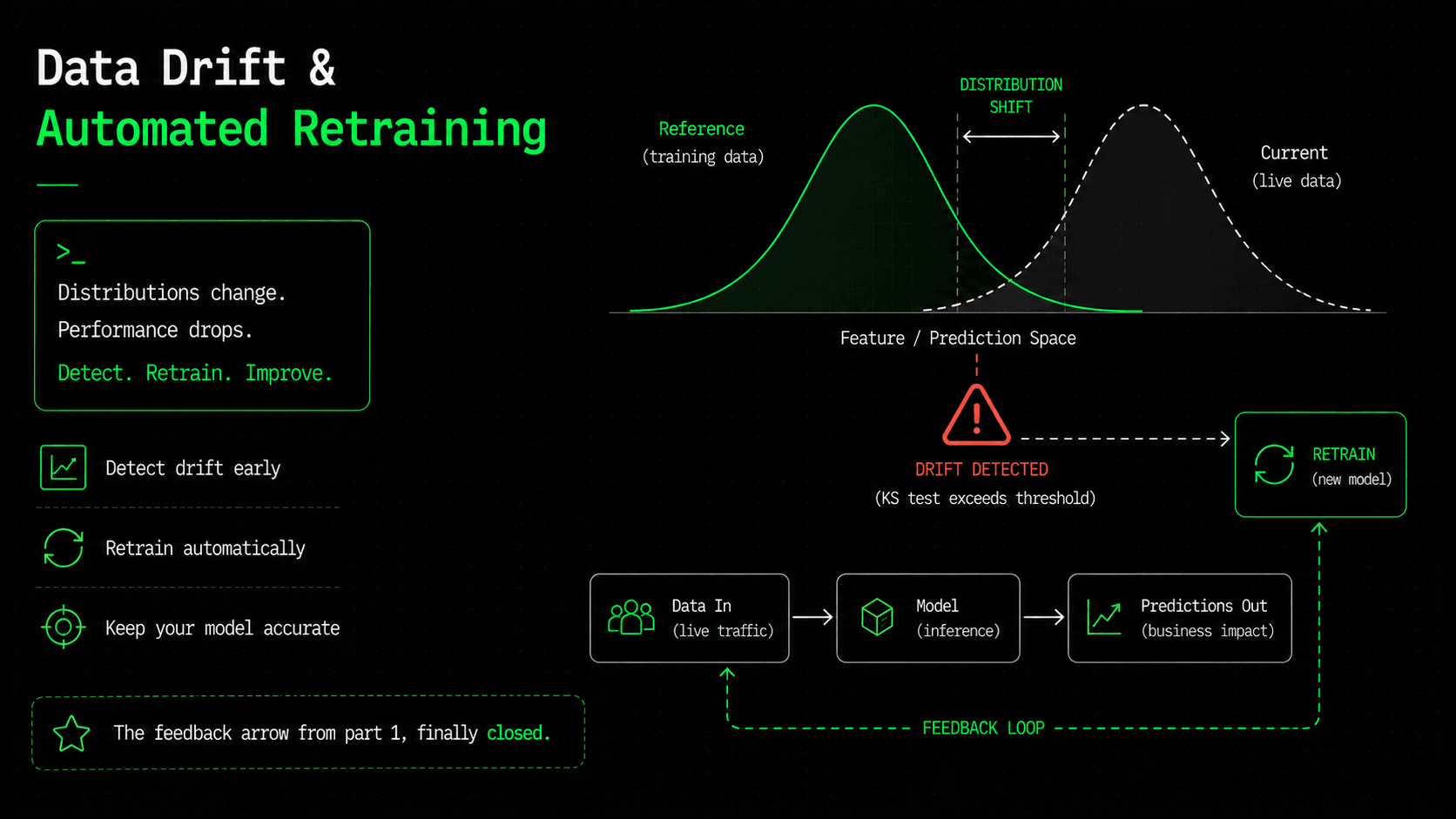
Back in part one, I made a claim and asked you to remember it: a model can sit frozen for six months, with not one line of code changed, and still get worse. This is the part where we deal with that. Every other failure in this series has a cause you can point at — a bad deploy, a CVE, an out-of-memory crash. Drift has no such cause. The code is fine. The infrastructure is fine. The world simply moved on, and the model is still answering questions about the world as it was on training day.
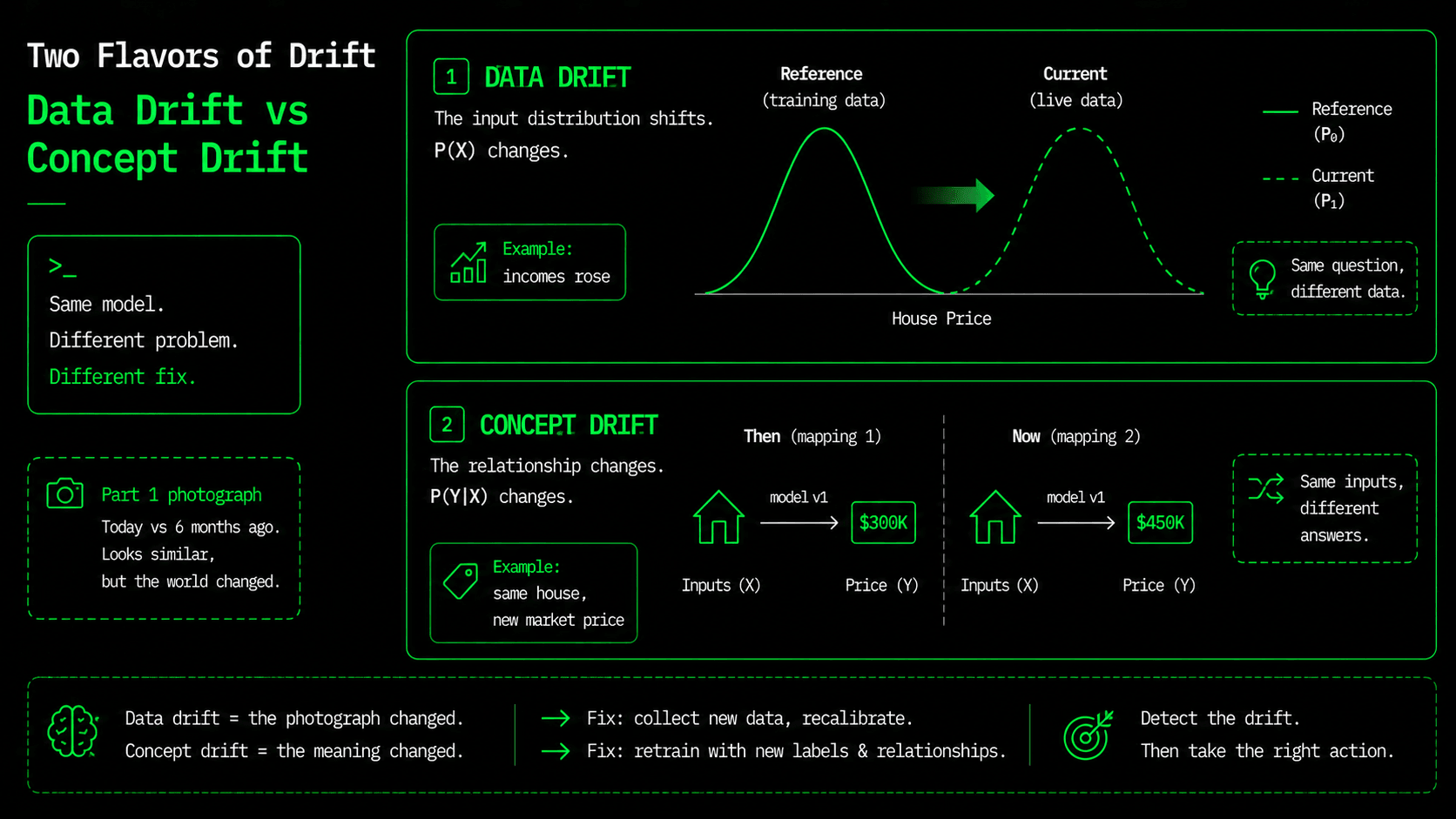
Remember the photo analogy from part one? The model is a photo of the world at the moment it was trained. Drift is the gap between that photo and today, and it comes in two forms. Data drift (also called covariate shift) means the inputs change shape — incomes rise, neighborhoods grow denser, your users move to mobile. Concept drift is worse: the relationship between the inputs and the answer changes — the same house features are simply worth a different amount in a new market. Both quietly eat away at accuracy while every dashboard from part nine stays green.
You already built the first sensor
In part nine we started emitting a histogram of predicted_price_dollars. That wasn't an accident — it's a live view of your model's output distribution, and a sudden shift in it's often the first visible symptom of drift. But an output histogram only tells you that something changed; it doesn't tell you what, and it can't run the statistical test that turns "looks different" into "is different." For that, we compare distributions directly.
Detecting data drift with a KS test
The tool is boring and effective: a two-sample Kolmogorov-Smirnov (KS) test. Take the feature values the model trained on (the reference) and a recent sample of production inputs (the current), and for each feature ask: "could these two samples have come from the same distribution?" A low p-value says no — that feature has drifted. It's the same idea as a diff, but for distributions instead of text.
# drift/detect_drift.py  (core)
from scipy.stats import ks_2samp

P_THRESHOLD = 0.05  # below this, call it drift

def check(reference, current):
    drifted = []
    for i, name in enumerate(FEATURES):
        stat, p = ks_2samp(reference[:, i], current[:, i])
        if p < P_THRESHOLD:
            drifted.append(name)
    return drifted
To see it work, we compare the reference against two samples: one drawn from the same distribution, and one where we pushed incomes and household density upward to simulate a market that moved. The test should stay quiet on the first sample and fire on exactly the features we changed, and it does:
=== Scenario A: same distribution ===
  MedInc      p= 0.667  ok
  AveOccup    p= 0.484  ok
  ... (all features ok) -> no drift

=== Scenario B: shifted distribution ===
  MedInc      p= 0.000  DRIFT
  HouseAge    p= 0.585  ok
  AveOccup    p= 0.000  DRIFT
  ... -> drift on: MedInc, AveOccup
That's real output from the script. Notice the precision: it flags MedInc and AveOccup — the two features we actually shifted — and leaves the other six alone. No false alarms on the stable features, a clear signal on the moved ones. The script exits with a non-zero code when it finds drift, and that exit code is the hook that lets a pipeline act on it.
Two honest warnings, because a drift detector that alarms too often gets ignored. First, a KS test on enough data will flag shifts that are statistically significant but too small to matter, so in practice you pair the p-value with an effect-size threshold. Second, this catches data drift (shifting inputs) but not concept drift, where the inputs look identical yet the right answer has changed. Concept drift only becomes visible when you can compare predictions against real outcomes later, which is why the strongest drift signal of all is measuring live accuracy once the true values arrive.
Retraining: a trigger, not a schedule
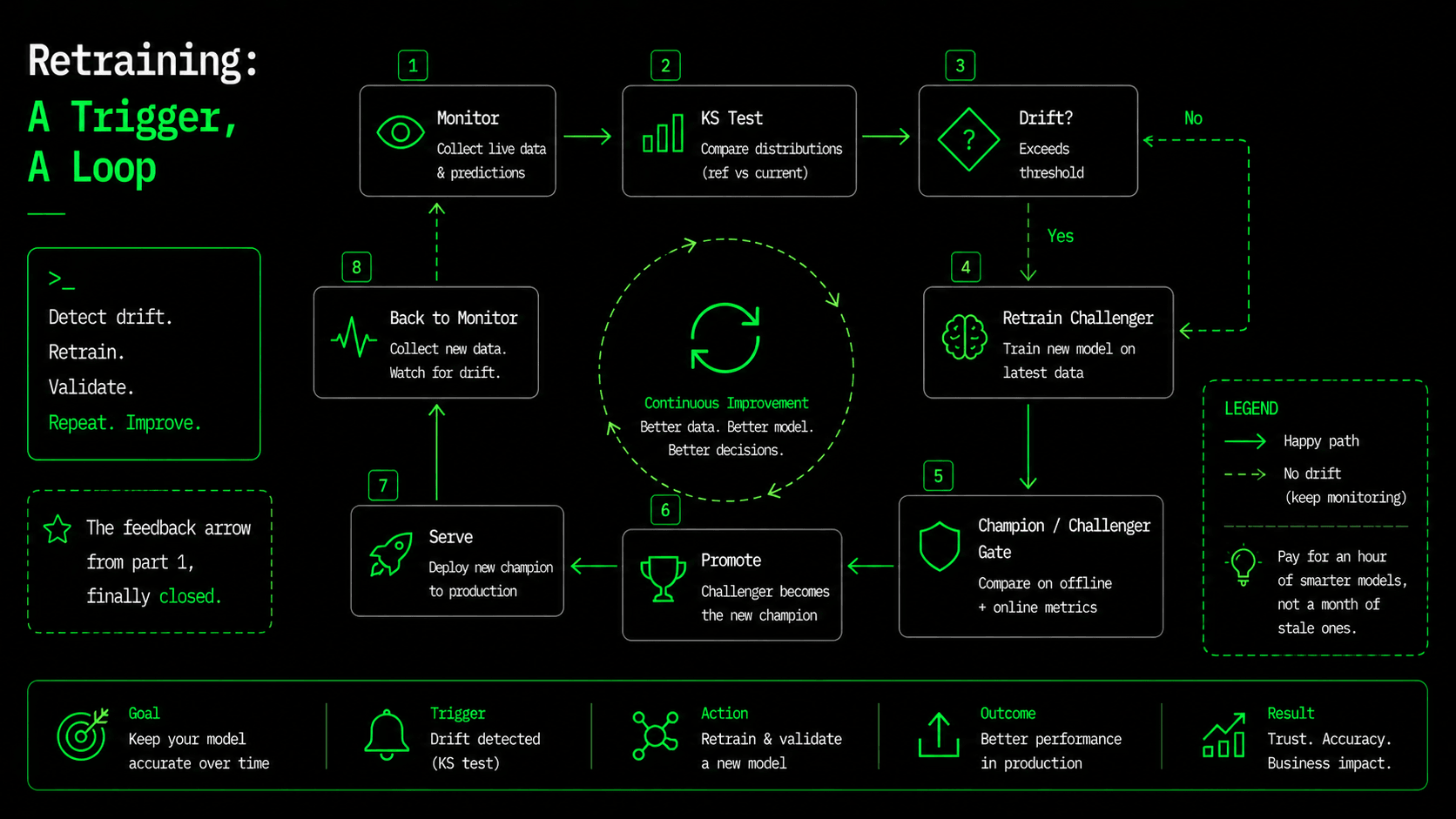
The first instinct is to retrain on a schedule — every night, every week. But that wastes money when nothing changed, and it's too slow when something breaks the day after the job ran. It's better to retrain when the data has actually moved. We already have the pieces: the drift detector says "the world moved," and the MLflow champion/challenger gate from part five says "only ship the new model if it's genuinely better." Connect them in sequence, and retraining becomes a decision the pipeline makes based on evidence.
# .github/workflows/retrain.yml
on:
  schedule:
    - cron: "0 6 * * 1"   # check weekly — checking is cheap, retraining is gated
  workflow_dispatch:

jobs:
  drift-check:
    runs-on: ubuntu-latest
    outputs:
      drift: ${{ steps.detect.outcome }}
    steps:
      - uses: actions/checkout@v4
      - run: pip install -r requirements.txt
      - id: detect
        continue-on-error: true      # a drift exit is a signal, not a failure
        run: python drift/detect_drift.py

  retrain:
    needs: drift-check
    if: needs.drift-check.outputs.drift == 'failure'   # only if drift was found
    runs-on: ubuntu-latest
    steps:
      - uses: actions/checkout@v4
      - run: pip install -r requirements.txt
      - run: python registry/train_mlflow.py    # train a challenger
      - run: python registry/promote.py         # promote ONLY if it beats champion
Read what this does end to end. A cheap weekly job checks for drift. If there's none, it does nothing and costs almost nothing. If drift is found, it retrains on fresh data, registers the result as a challenger in the MLflow registry, and runs the exact champion/challenger promotion from part five, which moves the production alias only if the new model actually wins. And because part five made serving load models:/house-price@production, the next time a pod starts or restarts, it picks up the promoted model — no image rebuild, no code change. Drift detected, model retrained, better model promoted, and on the pods' next restart the traffic moves over. A human only gets involved if they want to.
This is the feedback arrow from part one's lifecycle diagram, finally closed. The loop that made ML different from a normal web service — the one that meant a frozen model decays — now has a system watching for that decay and repairing it.
What's next
That's the last missing piece. We've gone from a model in a notebook to a self-serving, self-scaling, self-monitoring, and now self-healing system: it notices when its own predictions are going stale and does something about it. In part eleven we step back and assemble everything (API, Docker, CI/CD, MLflow, Kubernetes, Terraform, monitoring, and drift) into one complete end-to-end platform, and walk the full path a change takes from git push to a promoted model serving traffic. The drift detector and retrain workflow are in the series repo under drift/ and .github/. See you in part eleven, the finale.
$ ./work-with-me.sh
Want this in your job, not just your notes?
I take engineers from wherever they are to hired-in-6-months — real projects, code reviews, and mock interviews. Or if you just need a hand shipping something to production, let's work together.
or subscribe on YouTube — free, forever.
$ subscribe --new-articles
Get new articles in your inbox
One email when a new hands-on guide goes live — Kubernetes, AWS, CI/CD, MLOps. No spam, unsubscribe anytime.