Data Versioning with DVC & S3
Git tracks your code and MLflow tracks your models, but which dataset trained which model? DVC versions data the way Git versions code: a tiny pointer in Git, the bytes in S3. Hands-on init, add, remote, push, pull. Part 6 of the MLOps series.
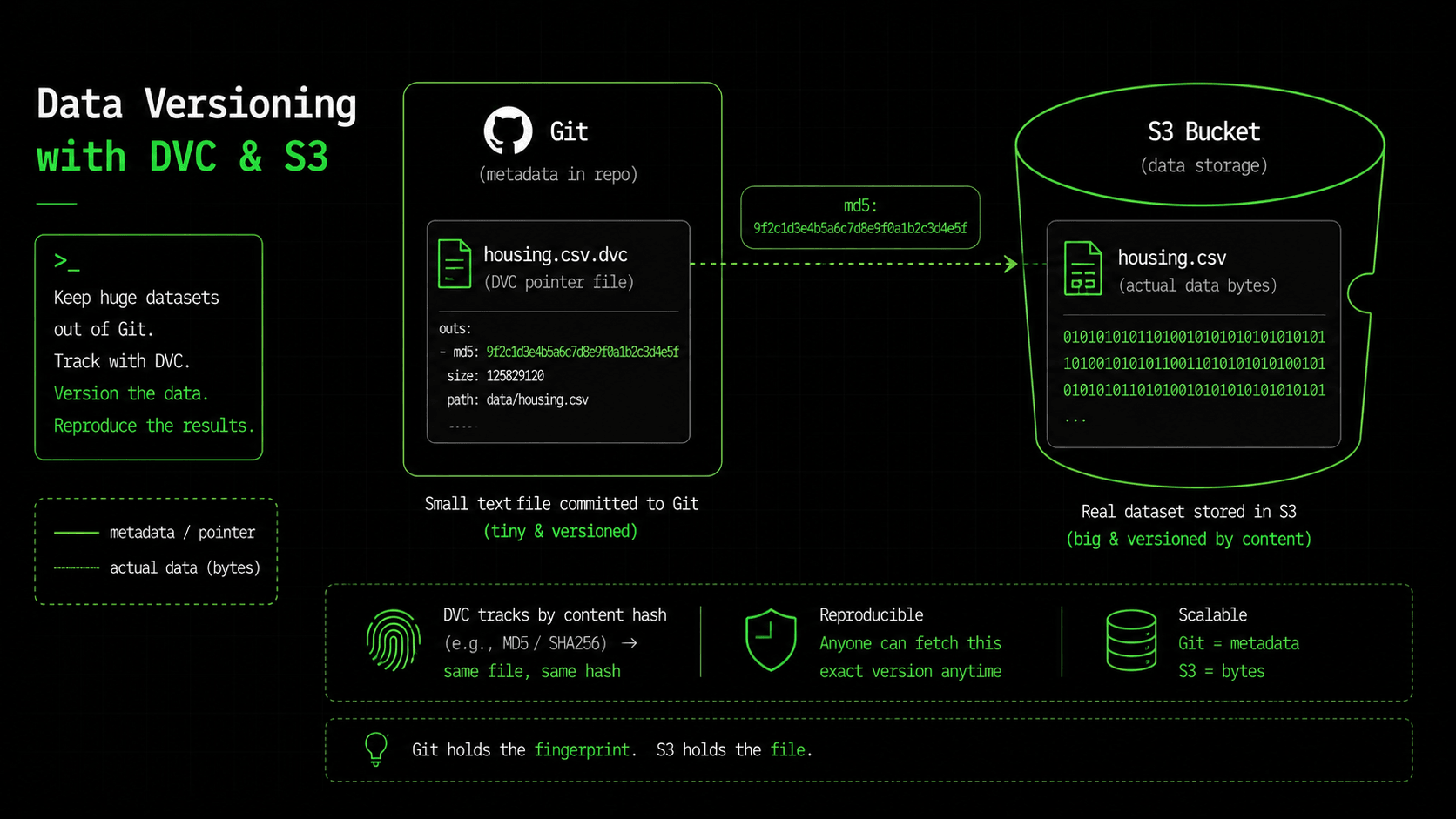
Let me ask a question that should make you uncomfortable. In part five we retrained the model, v2 beat v1, and we moved the production alias. Good. Now someone asks: what data did v1 learn from, exactly? Not just "the California housing dataset". Which 20,640 rows, from which snapshot, with which cleaning applied? You check Git. Git has no idea. The dataset was never in there; it was too big, so it lives in an S3 bucket that has been overwritten twice since then. The honest answer is "we don't know", and that's not something you want to say about a model making decisions in production.
Part one made a promise: to reproduce a deployment, you need the code version AND the data version AND the training config. We've solved code (Git) and model (MLflow). The missing one — data — is the gap this part closes. The tool is DVC, and if you know Git, you already know how it feels to use.
Why Git can't do this
Git is brilliant at versioning text. It stores line-level diffs, and it answers "what changed between these two commits?" instantly. Point it at a 2MB CSV, and that superpower disappears — the file becomes one opaque blob, every edit stores a whole new copy, and the diff is meaningless. Point it at a 5GB dataset and it gets worse: every clone drags along the full history of every version, and cloning becomes painfully slow. This is the same wall that pushes people to Git LFS the moment they commit a large binary file.
But Git LFS only solves half the problem. LFS versions the bytes; it still doesn't capture lineage, which rows, from which source, produced this file. What you actually want is Git's workflow (commit, branch, checkout, "this version belongs to that commit") applied to data that's too big for Git, while keeping the link between data and model. That's exactly what DVC is.
What DVC actually does
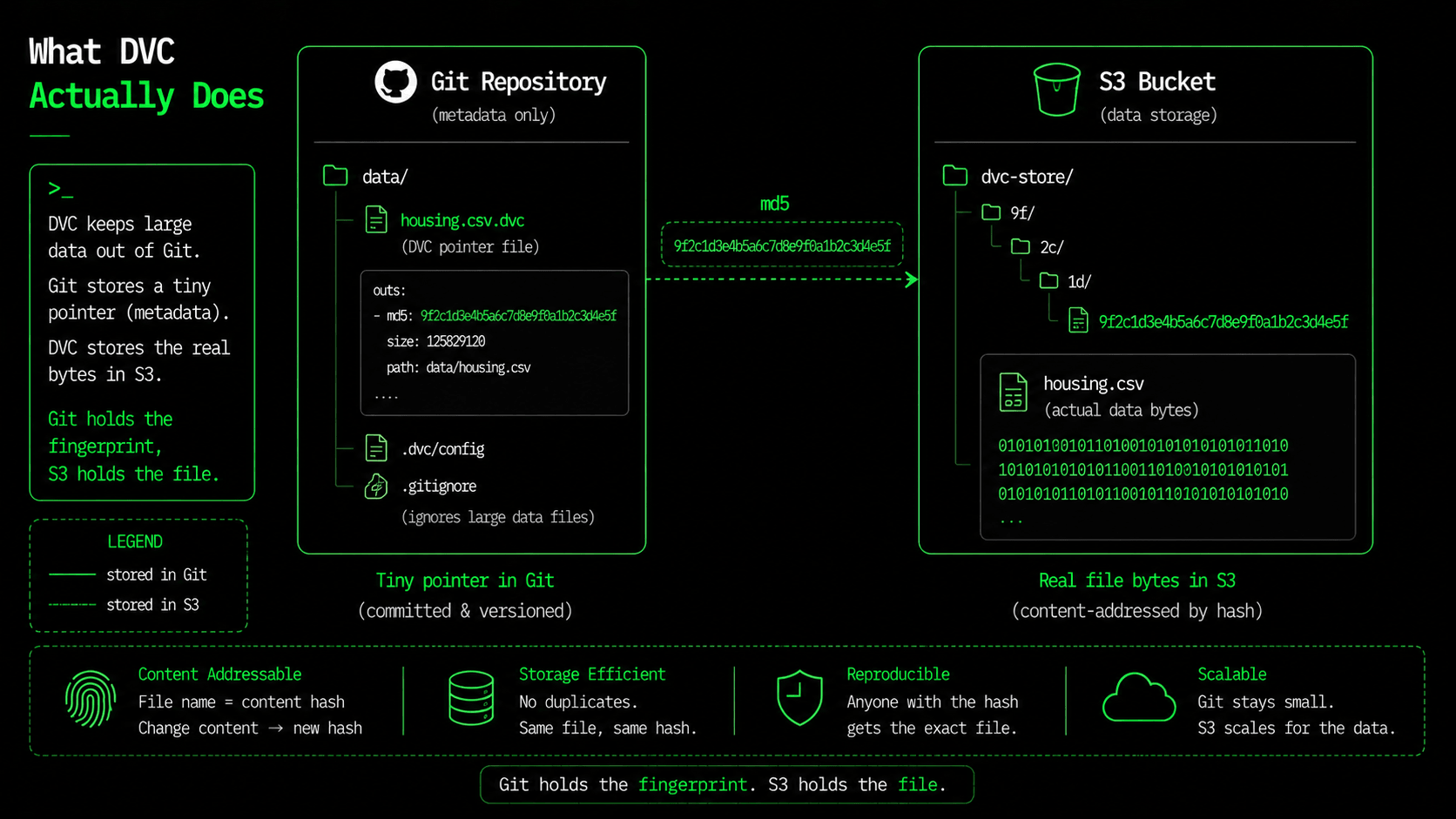
DVC is Git for data. The trick is a split: a tiny text pointer lives in Git, and the actual bytes live in remote storage — an S3 bucket, in our case. The pointer is a few lines containing a content hash; the bytes are stored under that hash, the same way a Docker layer is stored. Git stays small and fast because it only ever holds pointers. The heavy data sits in S3. And because the pointer is committed together with your code, checking out an old commit gives you the exact data version that belonged to it.
Hands-on: version a dataset
DVC works together with Git, so we start in a Git repo and initialize both. Installing is one pip command — use the s3 extra so DVC can talk to your bucket.
pip install "dvc[s3]"

git init          # DVC lives alongside Git
dvc init          # creates .dvc/ — commit this
dvc add data/housing.csv
That dvc add is the whole idea in one command. DVC hashes the file, moves the real bytes into its cache, and writes a pointer next to it. It also tells Git to ignore the real file, so you never accidentally commit 2MB (or 5GB) of data into history:
# data/housing.csv.dvc   <- this tiny file goes in Git
outs:
- md5: ca5b757f0729c68d74d05bf9d9ca8486
  size: 1895154
  hash: md5
  path: housing.csv

# data/.gitignore        <- DVC wrote this so Git skips the real file
/housing.csv
Read the pointer file. It's 94 bytes that say: "the data called housing.csv is whatever hashes to ca5b757f…, and it's 1,895,154 bytes." Git happily versions that. Change the dataset — add a month of fresh rows — and run dvc add again: the hash changes, so the pointer changes, so git diff shows that the data changed, even though the data itself never entered Git. That's the trick: Git tracks the fingerprint, DVC tracks the file.
Now point DVC at S3 and push the bytes there. The remote is just a bucket path; this config lives in .dvc/config and gets committed like everything else.
dvc remote add -d storage s3://my-mlops-bucket/dvcstore
dvc remote modify storage region us-east-1
dvc push# .dvc/config (committed to Git)
[core]
remote = storage
['remote "storage"']
url = s3://my-mlops-bucket/dvcstore
region = us-east-1
# dvc push ->
1 file pushedThe bytes are now in S3, stored under their hash (…/files/md5/ca/5b757f…), not under their name. Store two identical datasets and you only pay for one copy, because content-addressing removes duplicates for free — the same reason Docker doesn't re-download a layer it already has. If you have AWS credentials in your environment (the OIDC role from part four works), that push just uploaded to S3. I had no credentials on this machine, so I tested the mechanics against a local remote first — the command and the result are identical either way.
The payoff: git clone + dvc pull
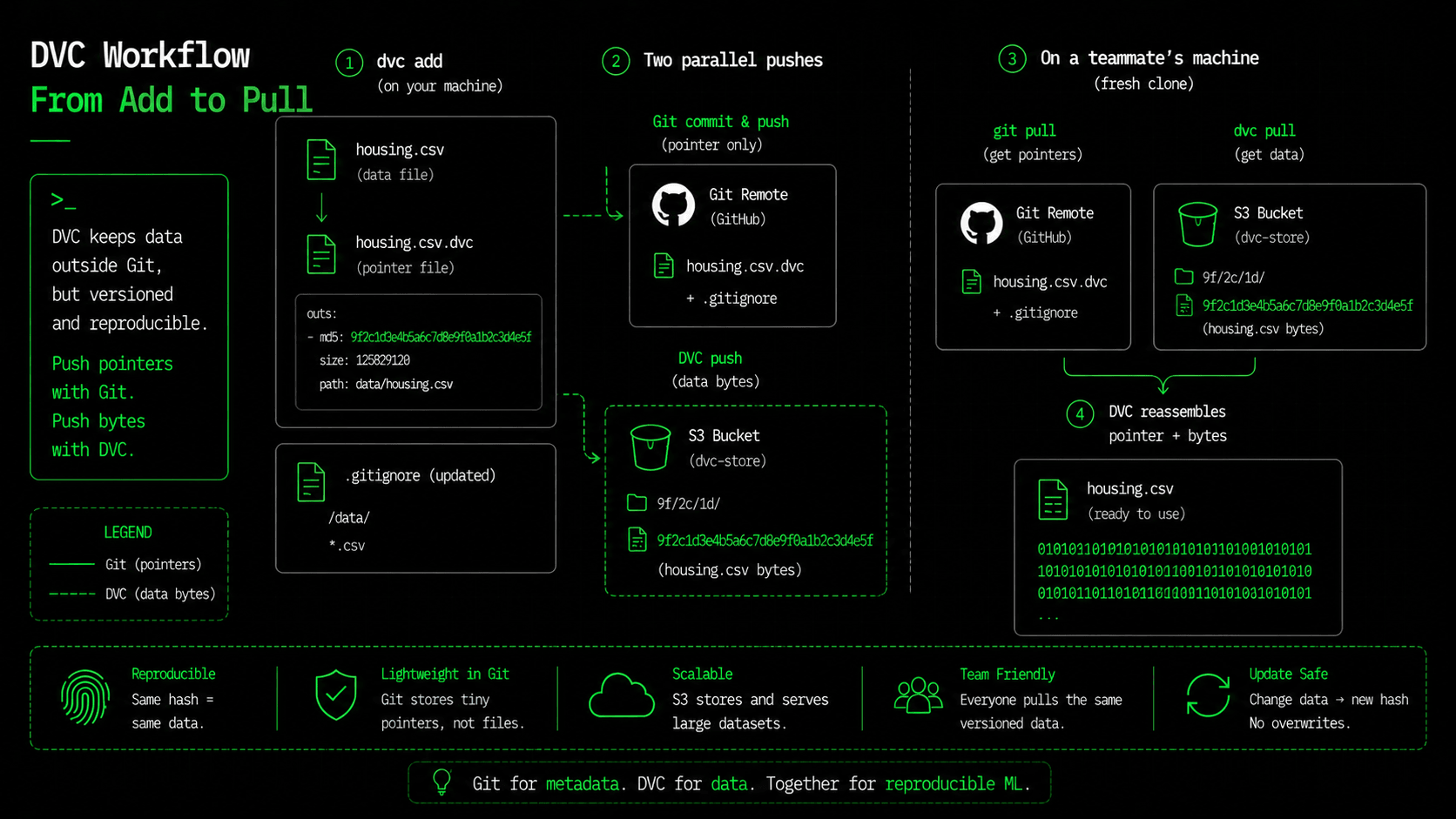
Here's what a teammate does on a fresh machine, and it's the moment DVC earns its place:
git clone <repo>      # fast — pulls code + tiny pointers only
dvc pull             # fetches the exact data bytes from S3

# checkout an old commit and its data comes with it:
git checkout v1-release
dvc checkout         # data snaps back to what v1 trained on
git checkout moves your code to any point in history; dvc checkout moves your data to match. The pointer committed at v1-release contains the exact hash of v1's dataset, so you get v1's exact data back, not a newer bucket that has been overwritten since. Remember "we don't know what v1 trained on" from the top of this article? Now it's a two-command answer.
Where this clicks into the series
Three layers now version three different things, and together they define what reproducibility really means: Git holds the code, DVC holds the data, MLflow holds the model. Each keeps a fingerprint the others can point at. In part one we made metadata.json travel with the artifact; the natural next step is to write the dataset's DVC hash into it, so a model artifact literally records which data version produced it. Then part five's champion/challenger question — "is the new model better?" — gets a partner question it couldn't answer before: "and what changed: the code, the data, or both?"
One thing I'm deliberately not turning this into: a data-science course. DVC can also define pipelines (dvc.yaml, dvc repro) that re-run training only when the data or code actually changed — like make, but for ML. It's worth knowing that exists, and we use the same idea when we automate retraining in part ten. For now, the win is smaller and more important: every model in this series can name the data it learned from.
What's next
We've got a reproducible stack now — code, data, model, container, pipeline — and it all still runs on one machine or one Fargate task. That stops being enough the moment you need to survive a node dying, scale under load, or roll out a new version without dropping a request. That's orchestration, and it's what part seven is for: we take the container from part three and hand it to Kubernetes. See you there.
$ ./work-with-me.sh
Want this in your job, not just your notes?
I take engineers from wherever they are to hired-in-6-months — real projects, code reviews, and mock interviews. Or if you just need a hand shipping something to production, let's work together.
or subscribe on YouTube — free, forever.
$ subscribe --new-articles
Get new articles in your inbox
One email when a new hands-on guide goes live — Kubernetes, AWS, CI/CD, MLOps. No spam, unsubscribe anytime.