Deploying ML Applications on Kubernetes
Take the inference container to a real cluster: Deployments, Services, Ingress, ConfigMaps, Secrets, and an HPA — with the readiness probe we've been building since part two finally doing its job. Part 7 of the MLOps series.
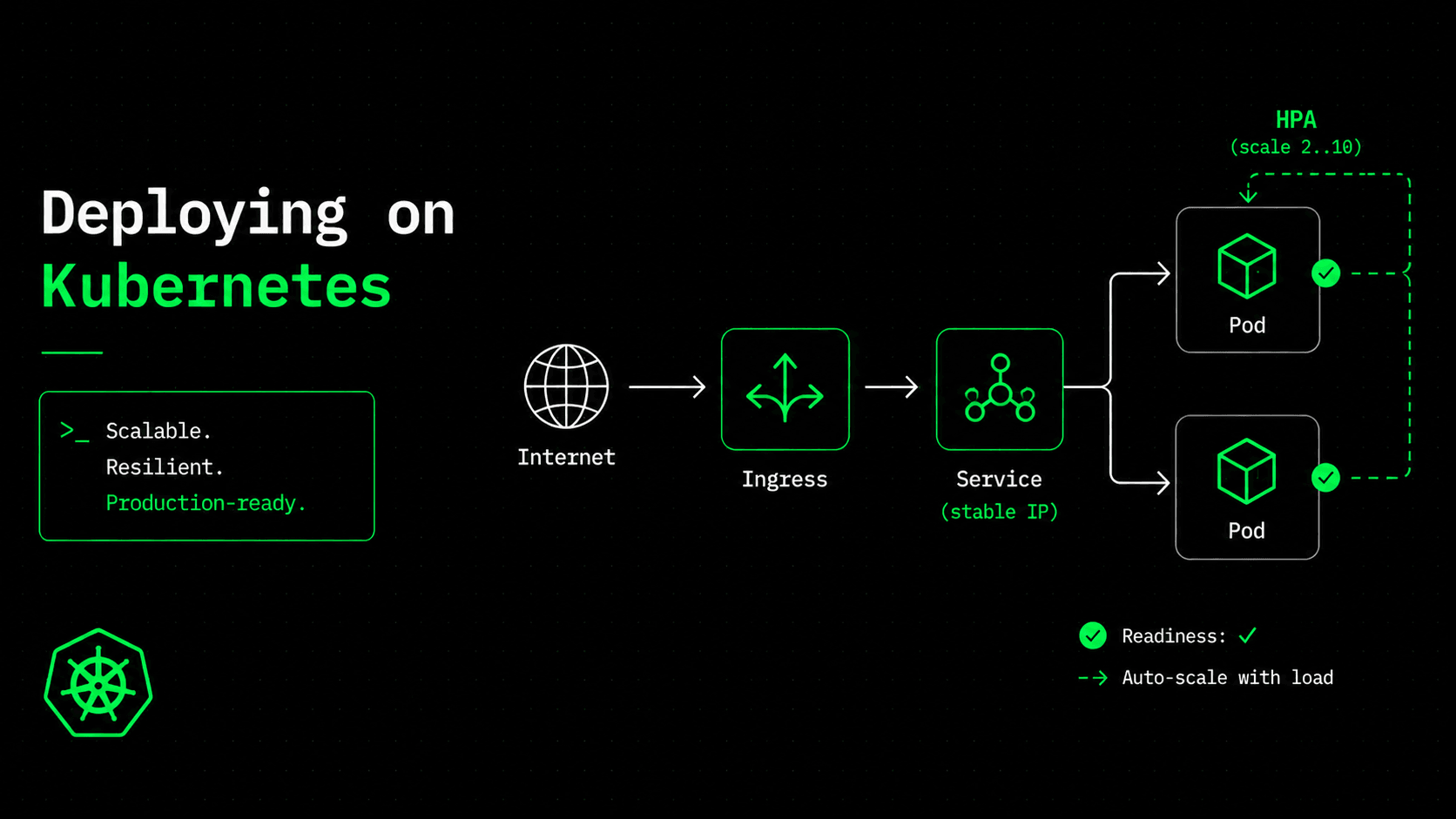
Our image runs anywhere Docker runs, which right now means docker run on one machine. That's fine until 3am, when the container runs out of memory, exits, and stays down, because nobody is awake to restart it. Or until traffic triples and one container is overloaded while nine idle CPU cores sit on the server next to it. Running a container is easy. Keeping it running, healthy, and correctly sized (without a human watching it) is a different job. That's the job Kubernetes exists to do.
One honest note before we start: you might not need Kubernetes yet. If a single server can handle your traffic, docker compose up from part three — or one container behind a load balancer — is a perfectly respectable production setup. Fewer moving parts, less to break, much cheaper to run. Reach for Kubernetes when you actually need what it offers: self-healing when a node dies, horizontal scaling under load, and zero-downtime rollouts. We're going there because the rest of this series builds on it, but "start simple and upgrade when the pain is real" is the right default, not a shortcut.
The good news, as in every part of this series: almost none of this is ML-specific. To Kubernetes, a model server is just a stateless HTTP service. The one place the model does show up — and it's the satisfying one — is the readiness probe we've been quietly building since part two. This is the article where it finally meets the thing it was designed for.
The Deployment: replicas that heal themselves
A Deployment is you describing a desired state — "I want two copies of this image running" — and Kubernetes constantly working to make reality match it. A pod crashes? It starts a new one. A node dies? It moves the pods onto another. You stop issuing commands and start declaring intent; the control loop does the watching for you.
apiVersion: apps/v1
kind: Deployment
metadata:
  name: house-price-api
spec:
  # no replicas: here — the HPA owns the count (see below)
  selector:
    matchLabels: { app: house-price-api }
  template:
    metadata:
      labels: { app: house-price-api }
    spec:
      containers:
        - name: api
          # Pin an immutable SHA tag, not :latest (part 4).
          image: <ACCOUNT_ID>.dkr.ecr.us-east-1.amazonaws.com/house-price-api:latest
          ports:
            - containerPort: 8000
          envFrom:
            - configMapRef: { name: house-price-config }
            - secretRef: { name: house-price-secrets }
          resources:
            requests: { memory: "512Mi", cpu: "250m" }
            limits: { memory: "1Gi", cpu: "1" }
Those resource numbers aren't guesses — they come straight from part two. Each worker loads its own ~47MB copy of the model, so memory grows with the worker count. We request 512Mi and cap at 1Gi to hold two workers plus some headroom. Set the requests too low, and Kubernetes packs too many pods onto a node, and they run out of memory under load. This is where "N workers means N copies of the model in RAM" stops being trivia and becomes a number you actually type.
The probes: where the model finally shows up
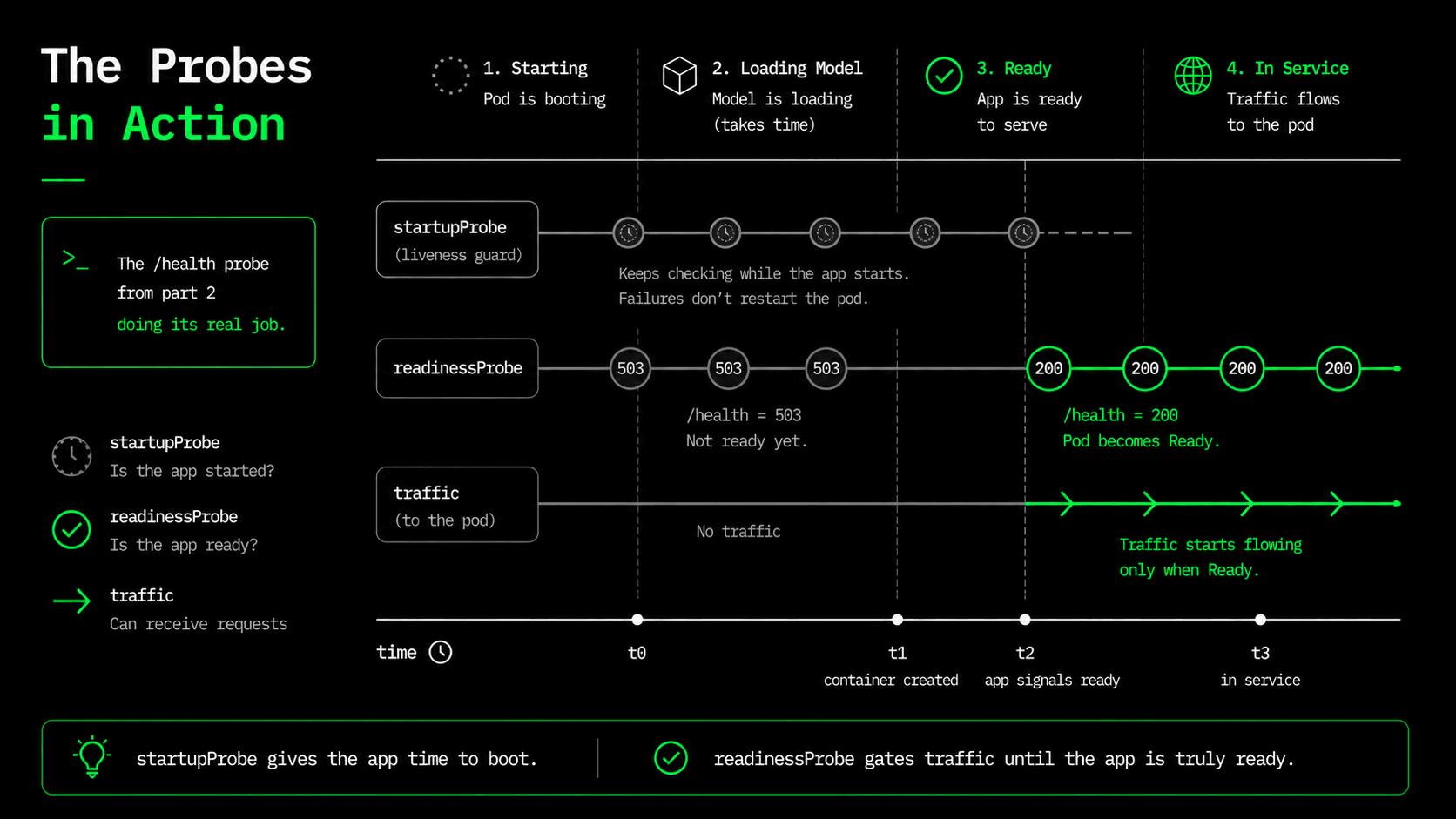
Here's the payoff after three articles of build-up. Kubernetes needs to know two different things about a pod, and mixing them up is a classic cause of outages. Liveness asks: "is this process stuck? Should I restart it?" Readiness asks: "is this pod ready for traffic? Should the load balancer send it requests?" For a model server these are genuinely different questions, because a pod can be alive for a second or two before the 47MB model finishes loading. Alive, but useless.
          # Give the model time to load before liveness/readiness judge it.
          startupProbe:
            httpGet: { path: /health, port: 8000 }
            failureThreshold: 30
            periodSeconds: 2
          # Readiness gates traffic: /health returns 503 until the model loads.
          readinessProbe:
            httpGet: { path: /health, port: 8000 }
            periodSeconds: 10
          # Liveness restarts a wedged pod.
          livenessProbe:
            httpGet: { path: /health, port: 8000 }
            periodSeconds: 15
Remember the readiness logic from part two: /health returns 503 while the model is still loading, and 200 once it's in memory. That single behavior is what makes this safe. The startupProbe gives the model up to a minute to load, so the liveness probe doesn't mistake a slow start for a hang and kill the pod in a restart loop. The readinessProbe keeps the pod out of the load balancer until /health returns 200, so no request ever lands on a pod that would fail. The "pointless" endpoint from part two is now the thing standing between you and an outage on every deploy. (We point all three probes at /health, which is fine here because it only returns 503 during the initial load window that the startupProbe covers. If your model could become un-ready at runtime — for example, a live model reload — you would add a separate lightweight /livez endpoint that only checks the process, and keep /health for readiness.)
The Service: a stable name for disposable pods
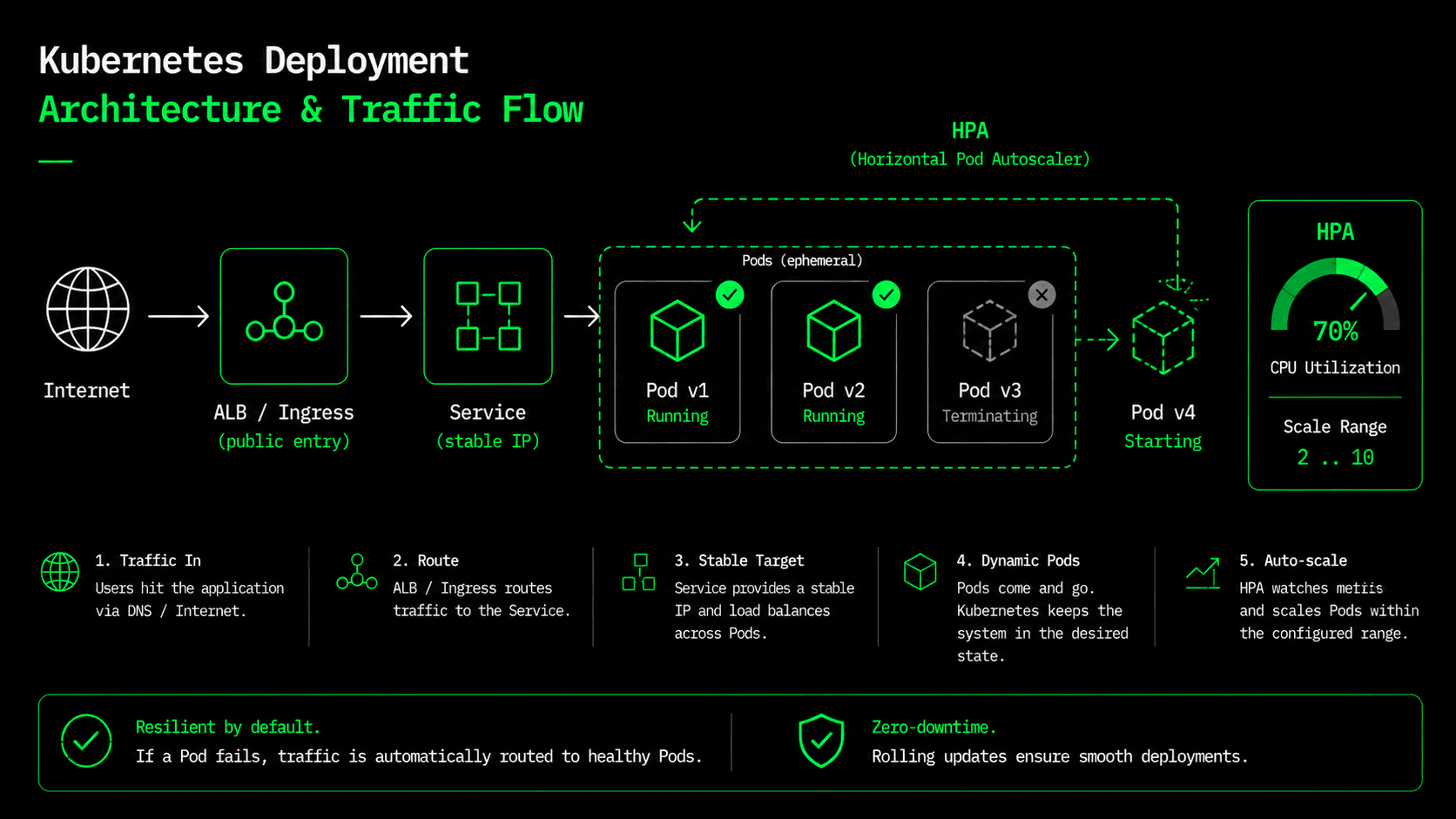
Pods are disposable. They die, get rescheduled, and come back with new IP addresses all the time, so you can never point a client directly at a pod. A Service is the stable front for a changing set of pods: one fixed virtual IP and DNS name that load-balances across whatever pods currently match its label selector. It's the in-cluster version of putting a load balancer in front of an autoscaling group: the members change, the address does not.
apiVersion: v1
kind: Service
metadata:
  name: house-price-api
spec:
  type: ClusterIP
  selector: { app: house-price-api }
  ports:
    - port: 80
      targetPort: 8000
Ingress: the door to the outside
A ClusterIP Service is only reachable inside the cluster. Ingress is the public door: it maps outside HTTP traffic to your Service, and on EKS the AWS Load Balancer Controller reads this manifest and provisions a real ALB to match. Notice the health-check path — the ALB checks the same /health everything else does, so readiness is enforced at every layer from the container up to the load balancer.
apiVersion: networking.k8s.io/v1
kind: Ingress
metadata:
  name: house-price-api
  annotations:
    kubernetes.io/ingress.class: alb
    alb.ingress.kubernetes.io/scheme: internet-facing
    alb.ingress.kubernetes.io/target-type: ip
    alb.ingress.kubernetes.io/healthcheck-path: /health
spec:
  rules:
    - http:
        paths:
          - path: /
            pathType: Prefix
            backend:
              service:
                name: house-price-api
                port: { number: 80 }
Config and Secrets: keep the image generic
The whole point of part three's image was that it runs the same everywhere. It can't do that if environment settings are baked into it. ConfigMaps hold the non-secret, per-environment settings; Secrets hold the sensitive ones. Our ConfigMap carries the model alias from part five (MODEL_ALIAS: production), and the Secret carries the address of the MLflow registry, so the same image, pointed at a different registry, serves a different model with no rebuild.
apiVersion: v1
kind: ConfigMap
metadata:
  name: house-price-config
data:
  MODEL_NAME: "house-price"
  MODEL_ALIAS: "production"
  LOG_LEVEL: "info"
---
apiVersion: v1
kind: Secret
metadata:
  name: house-price-secrets
type: Opaque
stringData:
  MLFLOW_TRACKING_URI: "http://mlflow.internal:5000"
One warning you should never forget: a Kubernetes Secret is base64-encoded, not encrypted at rest by default. Base64 isn't security — it's just an encoding. For anything real, back it with a proper secrets manager (AWS Secrets Manager via External Secrets, or Sealed Secrets). The manifest shows the shape; it's not permission to commit a real credential.
The HPA: scale on the signal that's actually saturating
Two replicas handle a normal day. A traffic spike needs more, and nobody should scale pods by hand at 3am. A HorizontalPodAutoscaler watches a metric and adds or removes replicas to hold a target. For us, the right signal is CPU, because inference is CPU-bound: model.predict() burns processor time, not memory or I/O. One gotcha worth remembering: once the HPA is applied, it owns the replica count, so leave replicas out of the Deployment entirely. Set it in both places, and a plain kubectl apply resets the count while the HPA immediately scales it back. The two will keep fighting each other.
apiVersion: autoscaling/v2
kind: HorizontalPodAutoscaler
metadata:
  name: house-price-api
spec:
  scaleTargetRef:
    apiVersion: apps/v1
    kind: Deployment
    name: house-price-api
  minReplicas: 2
  maxReplicas: 10
  metrics:
    - type: Resource
      resource:
        name: cpu
        target:
          type: Utilization
          averageUtilization: 70
When average CPU across the pods crosses 70%, the HPA adds replicas, up to ten. When the spike passes, it scales back down to two. Each new pod goes through the same startup and readiness steps, so it only receives traffic once its model is loaded. Self-healing from the Deployment, scaling from the HPA, zero-downtime rollouts from readiness-gated updates — that's the "keep it alive at 3am" machinery, declared in a few YAML files.
Rolling updates come free
Push a new image SHA (part four), change the tag in the Deployment, and Kubernetes rolls it out one pod at a time: start a new pod, wait for its readiness probe to pass, shift traffic, then retire an old pod. If the new model never becomes ready — say it fails to load — readiness never passes, the rollout stops instead of taking down the service, and you roll back to the previous SHA. Immutable image tags plus a readiness probe are what make a model deployment boring, which is exactly what you want a deployment to be.
A note on serving frameworks (KServe and friends)
We just hand-wrote a Deployment, a Service, an Ingress, and an HPA to serve one model. That's the right way to learn what's actually happening, but in a company running dozens of models, writing all four by hand for each one gets tiring fast. Frameworks like KServe, Seldon, and BentoML sit on top of Kubernetes and collapse all of that into a single resource: you declare an InferenceService pointing at a model, and they generate the serving, networking, and autoscaling for you. They even handle things that are tricky by hand, like scaling a model down to zero pods when it's idle, or sending only 10% of traffic to a new version first (a canary rollout). We stay with plain manifests in this series because they keep the mechanics visible. But if you find yourself copy-pasting the same four YAML files for every new model, that's the signal to move to a serving framework.
What's next
We now have a self-healing, autoscaling, zero-downtime deployment — described entirely in YAML. But it assumes a cluster already exists, plus an ECR repo, the ALB controller, and the IAM role the CI pipeline used back in part four. So far, we've simply assumed all of that infrastructure into existence. In part eight we stop assuming and define it with Terraform: the VPC, the EKS cluster, ECR, IAM, and S3 — as version-controlled code you can create and destroy on demand. The manifests are in the series repo under k8s/. See you in part eight.
$ ./work-with-me.sh
Want this in your job, not just your notes?
I take engineers from wherever they are to hired-in-6-months — real projects, code reviews, and mock interviews. Or if you just need a hand shipping something to production, let's work together.
or subscribe on YouTube — free, forever.
$ subscribe --new-articles
Get new articles in your inbox
One email when a new hands-on guide goes live — Kubernetes, AWS, CI/CD, MLOps. No spam, unsubscribe anytime.