Infrastructure as Code for MLOps with Terraform
Stop building infrastructure by hand. Provision the VPC, EKS cluster, ECR, S3, and the GitHub OIDC role with Terraform — reproducible, reviewable, and easy to destroy on demand. Part 8 of the MLOps series.
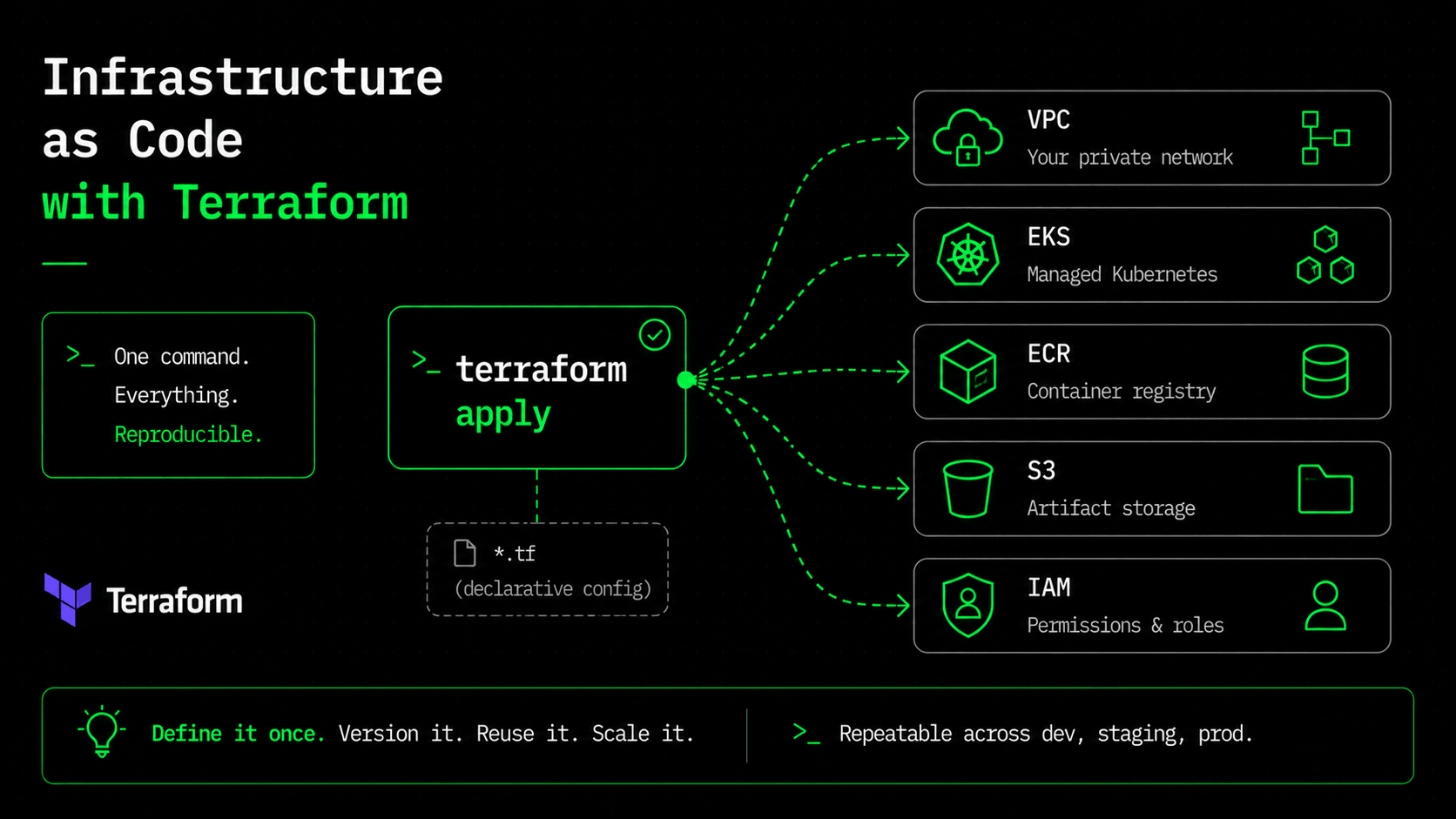
Count how many times this series has assumed infrastructure into existence. Part four assumed an ECR repo and an IAM role. Part five assumed an S3 bucket and a Postgres database for MLflow. Part seven opened with "assume a cluster already exists," then relied on an ALB controller and a VPC with exactly the right subnet tags. That's a lot of assuming. Every one of those things could be clicked together in the AWS console in an afternoon, and that afternoon is the trap.
Infrastructure built by console clicks works fine — right up until you need to explain it, change it, or rebuild it. Six months later, nobody remembers which boxes were ticked, the staging environment has quietly drifted away from production, and recreating any of it means digging through old history. We spent this whole series making the model and the app reproducible. Leaving the infrastructure as a pile of manual console clicks throws that discipline away at the most expensive layer.
Terraform is how we make the infrastructure reproducible too — the VPC, the cluster, the registry, the bucket, the IAM role — all as version-controlled code you can create, review in a pull request, and destroy on demand. This is the article that defines everything the previous four parts assumed.
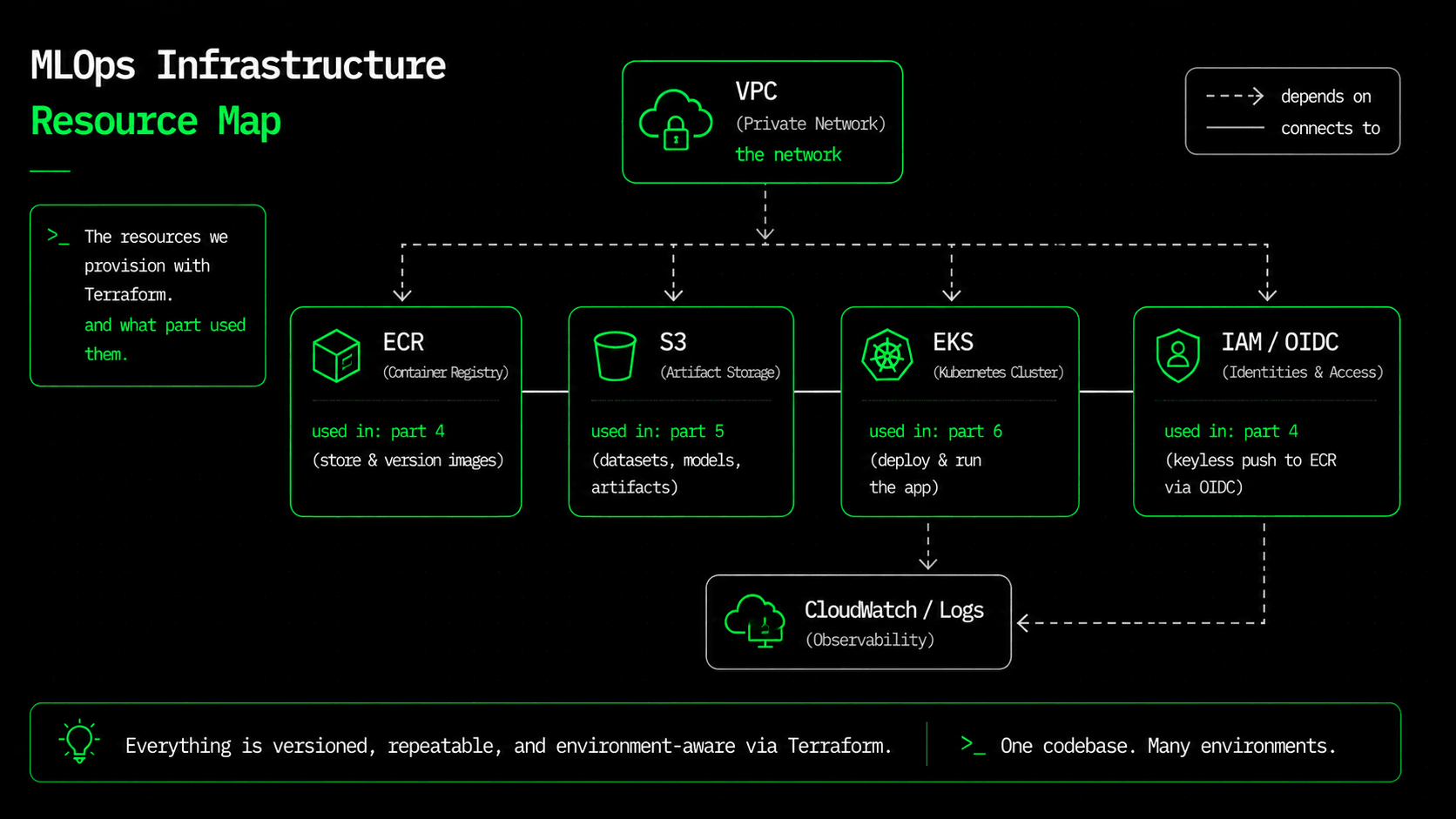
What we're provisioning, and which part needed it
- →VPC — the 2-AZ network the cluster lives in; the subnet tags part seven's Ingress needs to find its ALB.
- →EKS — the Kubernetes cluster part seven deploys into.
- →ECR — the immutable-tag registry the part-four pipeline pushes to.
- →S3 — where MLflow (part five) stores model artifacts in production instead of a local folder.
- →IAM + OIDC — the exact role part four's CI assumed, scoped to one repo, with no long-lived keys.
Notice this isn't a random collection of AWS services. It's a precise list of every dependency the earlier parts relied on. Infrastructure as code is where all the loose ends of this series get tied together into one apply.
The network and the cluster: don't hand-roll these
A production-grade VPC is a couple dozen resources: subnets across availability zones, route tables, a NAT gateway, an internet gateway. An EKS cluster adds the control plane, node groups, and a web of IAM roles on top. Writing all of that by hand is how you end up with a subtly broken network at 2am. The community modules are the sensible default, and using them isn't cheating; it's the same instinct as not writing your own auth library.
# network.tf
module "vpc" {
  source  = "terraform-aws-modules/vpc/aws"
  version = "~> 5.8"

  name = "${var.project}-vpc"
  cidr = "10.0.0.0/16"

  azs             = slice(data.aws_availability_zones.available.names, 0, 2)
  private_subnets = ["10.0.1.0/24", "10.0.2.0/24"]   # EKS nodes
  public_subnets  = ["10.0.101.0/24", "10.0.102.0/24"] # the ALB

  enable_nat_gateway = true
  single_nat_gateway = true  # one NAT keeps the demo cheap

  # These tags are how part seven's ALB Ingress finds its subnets.
  public_subnet_tags  = { "kubernetes.io/role/elb" = "1" }
  private_subnet_tags = { "kubernetes.io/role/internal-elb" = "1" }
}# eks.tf — the cluster the part-six manifests deploy into
module "eks" {
source = "terraform-aws-modules/eks/aws"
version = "~> 20.24"
cluster_name = "${var.project}-eks"
cluster_version = "1.30"
enable_irsa = true
vpc_id = module.vpc.vpc_id
subnet_ids = module.vpc.private_subnets
eks_managed_node_groups = {
default = {
instance_types = ["t3.large"] # 8GB — room for the model workers (part 7)
min_size = 2
max_size = 6
desired_size = 2
}
}
}t3.large isn't a random choice. Part two showed that each worker holds its own ~47MB model in RAM, and part seven sized the pods around that. 8GB nodes give the model workers room without over-paying. The infrastructure decisions and the application decisions are finally the same decisions, written down in the same repo.
ECR: immutability, enforced by the platform
In part four we agreed to tag images by commit SHA, so any running container can be traced back to its exact source. Terraform turns that from a habit you hope people keep into a rule the platform enforces:
resource "aws_ecr_repository" "api" {
  name                 = "${var.project}-api"
  image_tag_mutability = "IMMUTABLE"      # a pushed :<sha> can never be overwritten
  image_scanning_configuration {
    scan_on_push = true                   # belt-and-suspenders with Trivy in CI
  }
}
IMMUTABLE means once house-price-api:9f2c1a exists, nothing can ever repush a different image under that tag. The traceability from part four is now a property of the registry itself. scan_on_push adds a second CVE check behind the Trivy gate — defense in depth costs one line.
S3 and IAM: the last two loose ends
Part five promised MLflow would use "a real backend" in production. Here's half of it — a private, versioned bucket for model artifacts (the metadata lives in a Postgres you'd add the same way):
resource "aws_s3_bucket" "mlflow_artifacts" {
  bucket = "${var.project}-mlflow-artifacts-${data.aws_caller_identity.current.account_id}"
}

resource "aws_s3_bucket_public_access_block" "mlflow_artifacts" {
  bucket                  = aws_s3_bucket.mlflow_artifacts.id
  block_public_acls       = true
  block_public_policy     = true
  ignore_public_acls      = true
  restrict_public_buckets = true   # model artifacts are never public
}
And here's the OIDC role — the one the part-four pipeline used to push without a stored key. Its trust policy is the important part: it only hands out credentials to a token that proves it came from our specific repository.
resource "aws_iam_openid_connect_provider" "github" {
  url            = "https://token.actions.githubusercontent.com"
  client_id_list = ["sts.amazonaws.com"]
  # Since mid-2023 AWS validates this IdP against its CA chain and no longer
  # checks the thumbprint — it's kept for compatibility, not security.
  thumbprint_list = ["6938fd4d98bab03faadb97b34396831e3780aea1"]
}

# Only repo:${var.github_repo}:* may assume the role — any other repo's token
# is refused. This is the whole reason OIDC beats a shared secret.
data "aws_iam_policy_document" "github_assume" {
  statement {
    actions = ["sts:AssumeRoleWithWebIdentity"]
    principals {
      type        = "Federated"
      identifiers = [aws_iam_openid_connect_provider.github.arn]
    }
    condition {
      test     = "StringLike"
      variable = "token.actions.githubusercontent.com:sub"
      values   = ["repo:${var.github_repo}:*"]
    }
  }
}
The workflow: plan, apply, and the outputs that wire everything
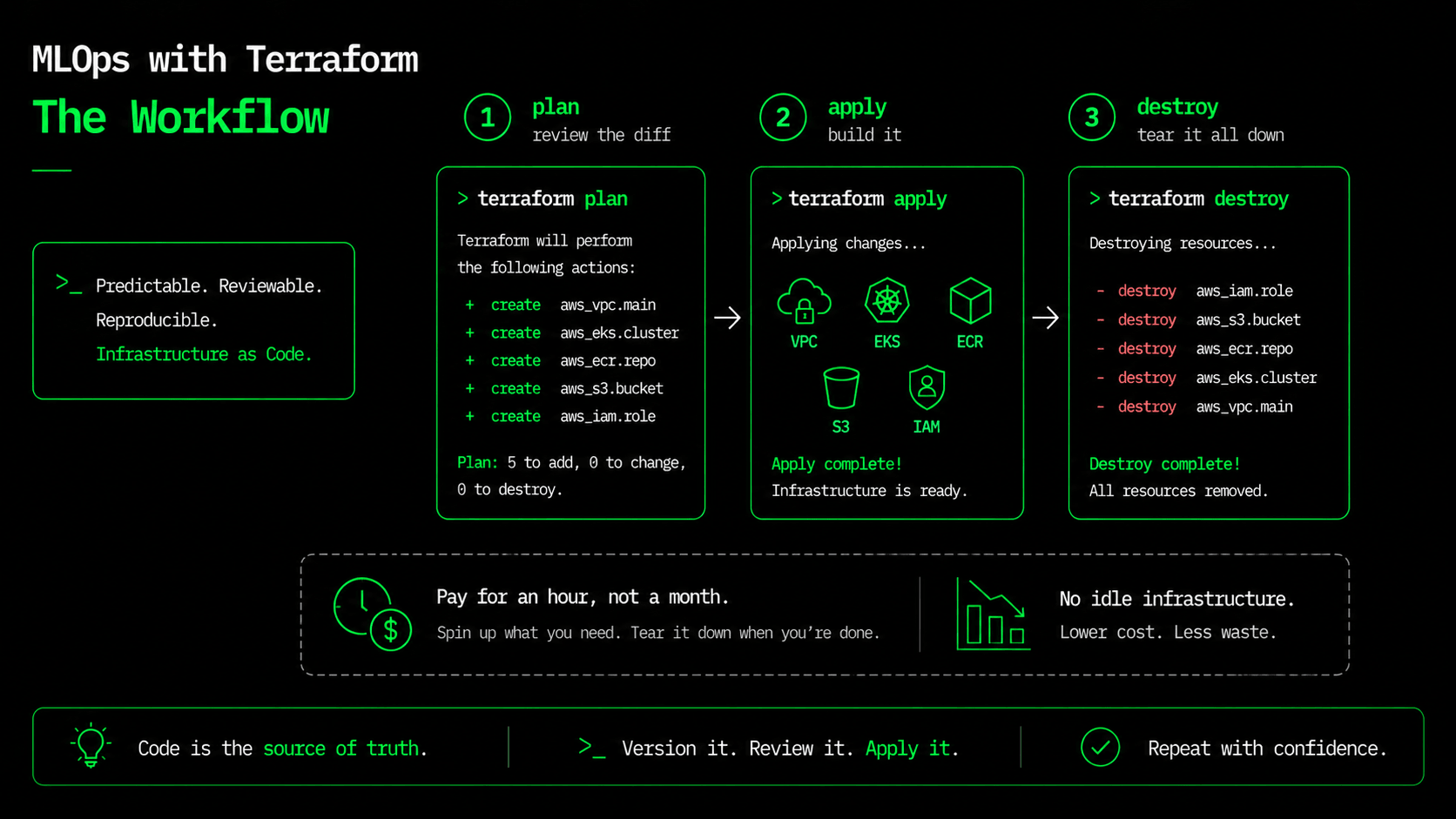
terraform init      # download providers + modules
terraform plan      # show exactly what will change — review this like code
terraform apply     # build it
terraform plan is the habit that makes infrastructure as code safe: it prints the exact diff before anything happens, so infrastructure changes get reviewed the same way code does. And the outputs connect back to every earlier part. They give you the ECR URL your CI pushes to, the role ARN you paste into the part-four workflow, and the one command that points kubectl at the new cluster so part seven's manifests have somewhere to go:
Outputs:
configure_kubectl       = "aws eks update-kubeconfig --region us-east-1 --name house-price-eks"
ecr_repository_url      = "<ACCOUNT>.dkr.ecr.us-east-1.amazonaws.com/house-price-api"
github_actions_role_arn = "arn:aws:iam::<ACCOUNT>:role/github-actions-ecr-push"
Two things you shouldn't skip. First, keep your Terraform state in S3 with a lock table, not on your laptop — shared infrastructure with local state is how a merge conflict ends up deleting a cluster. Second, know that this stack costs real money: EKS, a NAT gateway, and an ALB bill by the hour whether anyone uses them or not. When you're done following along, terraform destroy tears everything down as cleanly as it was built. That create-and-destroy-on-demand ability is the quiet superpower: spin up a full environment to test a change, then delete it, and pay for an hour instead of a month.
What's next
Everything now exists as code: the model, the API, the image, the pipeline, the registry, the manifests, and the AWS infrastructure under all of it. You can rebuild the entire platform from an empty account with a handful of commands. But a running system you can't see is a running system you can't trust — right now we have no idea how many requests it's serving, how slow predictions are, or whether it's healthy beyond a green checkmark. In part nine we add eyes: Prometheus, Grafana, and real application metrics. The Terraform is in the series repo under terraform/. See you in part nine.
$ ./work-with-me.sh
Want this in your job, not just your notes?
I take engineers from wherever they are to hired-in-6-months — real projects, code reviews, and mock interviews. Or if you just need a hand shipping something to production, let's work together.
or subscribe on YouTube — free, forever.
$ subscribe --new-articles
Get new articles in your inbox
One email when a new hands-on guide goes live — Kubernetes, AWS, CI/CD, MLOps. No spam, unsubscribe anytime.