Draft — the system is built, the drills are not all run yet. Every number here is marked pending until it is measured.
Deploying an open-source LLM on AWS without leaking the data it reads
Two open-source vision models reading national ID cards, self-hosted with vLLM on a SageMaker GPU. The network with no way out, the three IAM roles, the features that quietly copy your data, and the checks I ran against the live account to prove each control holds.
The problem · “We can't send customer documents to OpenAI. Can we run the model ourselves, safely?”
A client in Pakistan needed software that reads national identity cards, passports and utility bills and checks them for a KYC decision. The quick build is to send each photo to a hosted model API. They could not do that. These are regulated identity documents, and every copy that lands outside their control is a compliance question they would have to answer.
So the models run inside their own AWS account: Qwen3-VL-8B and PaddleOCR-VL, two open-source vision models, served by vLLM on one NVIDIA L40S GPU behind a SageMaker endpoint. This article covers how that deployment is locked down, and the checks I ran against the live account to see whether each control actually holds.
Self-hosting does not make it private
The common assumption is that once the model runs on your own GPU, the privacy problem is solved. It is not. It has moved. With a hosted API there is one place the data goes. With a self-hosted model there are a dozen, and closing every one of them is now your job:
- →The network. A container that can download its weights from the internet can send anything else there too.
- →Identity. Every AWS role that can read the document bucket is one more way to leak what is in it.
- →Helpful features. SageMaker Data Capture, vLLM prefix caching, access logs and error trackers all keep copies of what the model read, and most of them are one setting away from being switched on.
- →Deletion. On a versioned S3 bucket,
DeleteObjectleaves the file fully recoverable.
The architecture
Four subnet tiers, and each one can reach less than the one before it.
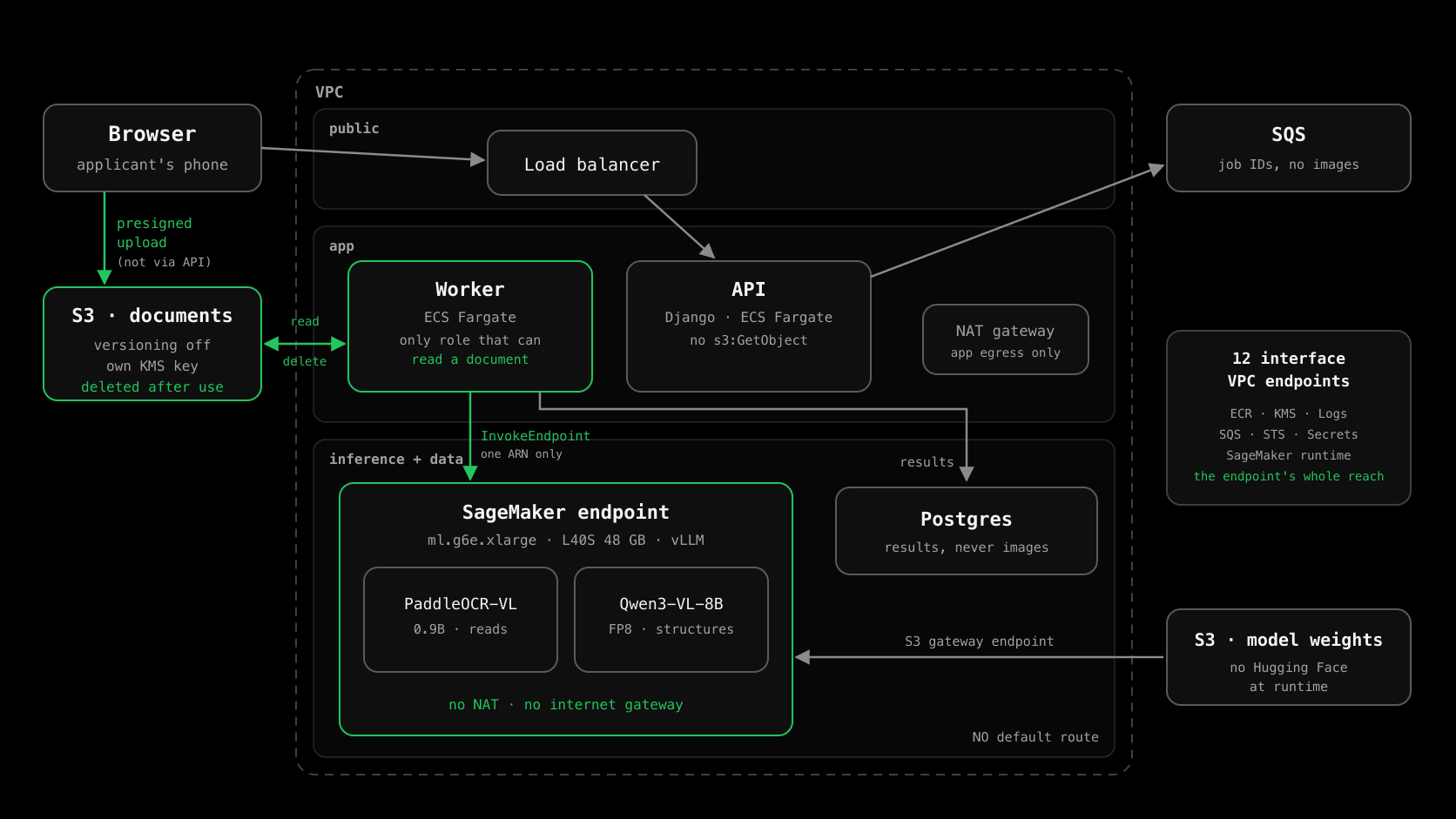
- →public: the load balancer, and nothing else.
- →app: the Django API and the document worker on ECS Fargate. This tier has a NAT gateway, because the API has to call external services.
- →inference: the SageMaker endpoint. No NAT, no internet gateway, no default route.
- →data: Postgres, on the same isolated route table.
Document images never pass through the API. The browser uploads straight to S3 using a presigned URL. The worker picks the job up from SQS, reads the image into memory, sends it to the model inside the VPC, commits the result to the database, and then deletes the image.
Step 1: a GPU subnet with no way out
The inference and data subnets share one route table, and that table has no default route at all:
# Inference + data tiers: deliberately no default route.
resource "aws_route_table" "isolated" {
  vpc_id = aws_vpc.this.id
}

# S3 through a gateway endpoint: free, and the traffic never
# touches the public internet.
resource "aws_vpc_endpoint" "s3" {
  vpc_id            = aws_vpc.this.id
  service_name      = "com.amazonaws.${var.region}.s3"
  vpc_endpoint_type = "Gateway"
  route_table_ids   = [aws_route_table.isolated.id, aws_route_table.app.id]
}
With no route out, the endpoint can reach only the AWS services you name. Here that is twelve interface endpoints: ECR (both halves), KMS, Secrets Manager, CloudWatch Logs and metrics, SQS, STS, the SageMaker runtime, and three Systems Manager endpoints for shell access. That list is everything the endpoint can reach, and you can read it in one file.
I checked the live route table rather than trusting the Terraform. It holds exactly two routes: the VPC's own address range, and S3's prefix list through the gateway endpoint. Nothing else.
The part that broke. The endpoint's security group at first allowed outbound HTTPS only to the VPC's own CIDR. That looked right, because every interface endpoint lives inside the VPC. Then the model failed to start with Failed to download model data from URL, an error that points you at IAM or routing. The real cause was different. Traffic to an S3 gateway endpoint goes to S3's public address ranges, not to an address inside the VPC, so the security group was blocking it. The fix is an egress rule for S3's managed prefix list:
data "aws_prefix_list" "s3" {
  name = "com.amazonaws.${data.aws_region.current.name}.s3"
}

resource "aws_security_group" "endpoint" {
  vpc_id = var.vpc_id

  # Interface endpoints (ECR, logs, KMS) live inside the VPC.
  egress {
    from_port   = 443
    to_port     = 443
    protocol    = "tcp"
    cidr_blocks = [var.vpc_cidr]
  }

  # The S3 gateway endpoint: a prefix list, not a CIDR.
  egress {
    from_port       = 443
    to_port         = 443
    protocol        = "tcp"
    prefix_list_ids = [data.aws_prefix_list.s3.id]
  }
}
Step 2: the weights come from your bucket, not from Hugging Face
A subnet with no internet also has no route to huggingface.co. So the weights are copied once into a private S3 bucket, and SageMaker syncs them to /opt/ml/model when the endpoint starts. Two settings make that work well:
- →An uncompressed S3 prefix, not a `model.tar.gz`. The two models are over ten gigabytes together. Pointing SageMaker at a prefix with
compression_type = "None"skips the untar step, which is one of the slowest parts of a large-model cold start. - →Offline flags.
HF_HUB_OFFLINE=1andTRANSFORMERS_OFFLINE=1stop the libraries from trying to reach the hub at all. In a subnet with no internet, any attempt like that can only hang or fail.
resource "aws_sagemaker_model" "this" {
  execution_role_arn = aws_iam_role.execution.arn

  primary_container {
    image = var.image_uri   # our own vLLM image, in our own ECR

    model_data_source {
      s3_data_source {
        s3_uri           = "s3://${var.model_bucket}/models/"
        s3_data_type     = "S3Prefix"
        compression_type = "None"
      }
    }

    environment = {
      HF_HUB_OFFLINE       = "1"
      TRANSFORMERS_OFFLINE = "1"
    }
  }

  vpc_config {
    subnets            = var.inference_subnet_ids
    security_group_ids = [aws_security_group.endpoint.id]
  }
}
The container is our own image, built on vllm/vllm-openai, with a small FastAPI router in front that implements SageMaker's /ping and /invocations contract. Because of that, the same image runs with a plain docker run on any GPU machine. That portability is deliberate. If the client's regulator later requires the data to stay in the country, the model can move to a local data centre without being repackaged.
Step 3: three roles, and only one can read a document
Three AWS identities touch this system, and each gets only what its job needs:
- →The API can create presigned upload URLs and delete an upload that has been replaced. It has no `s3:GetObject`, so it cannot read a single document, even if someone takes over the process.
- →The worker is the only identity that can read and delete document images, and the only one that can call the model. That permission is scoped to one endpoint ARN, not
sagemaker:*. - →The SageMaker execution role can read the model-weights bucket and write its own logs. It has no access to the document bucket at all. The image arrives in the request body, and the endpoint never fetches anything itself.
Taking GetObject away from the API left one small problem. After the browser uploads a file, the API needs to confirm it actually arrived, and the obvious calls, HeadObject and GetObjectAttributes, both require s3:GetObject. The answer is ListObjectsV2, restricted to the upload prefix. It returns the key and the size, and nothing about the contents:
# API task role. Deliberately NO s3:GetObject: the API must never
# be able to read document bytes. Only the worker can.
{
  Sid      = "PresignUploads"
  Effect   = "Allow"
  Action   = ["s3:PutObject", "s3:DeleteObject"]
  Resource = "${var.ingest_bucket_arn}/*"
},
{
  # Confirm an upload landed: key and size, never the contents.
  Sid       = "ConfirmUploadsExist"
  Effect    = "Allow"
  Action    = ["s3:ListBucket"]
  Resource  = var.ingest_bucket_arn
  Condition = { StringLike = { "s3:prefix" = ["ingest/*"] } }
},
Then I tested the live roles with the IAM policy simulator, rather than reading the policy and assuming:
- API role: s3:GetObject on a document
- denied
- API role: s3:PutObject (the presigned upload)
- allowed
- Worker role: InvokeEndpoint on its own endpoint
- allowed
- Worker role: InvokeEndpoint on any other endpoint
- denied
No statement grants it, so the default deny applies.
Tested with an arbitrary endpoint ARN in the same account and region.
Step 4: switch off the features that copy your data
This is the step most deployments miss, because none of these features looks like a data store. Each one keeps a copy of the document after the request has finished.
- →SageMaker Data Capture. It writes raw inference requests to S3, which here means the ID card images and the prompts. It is off by default, and it is commonly switched on for model monitoring. Turning it on would quietly rebuild the document store the rest of this design exists to delete. It is absent from the endpoint configuration, and a test fails the build if
data_capture_configever appears in the Terraform. - →vLLM prefix caching. It keeps KV-cache blocks in GPU memory, keyed by prompt prefix, and reuses them across requests. That is useful for a chatbot. Here it means content from one applicant's document stays on the GPU after their request ends. It is disabled with
--no-enable-prefix-caching. - →Access and request logs. Uvicorn's access log is off, and the router logs only which model served a request, the status code and the duration. It never logs the body.
- →Core dumps. A core dump is a copy of process memory, and the worker holds documents in memory. Core dumps are disabled on the worker container.
def test_sagemaker_data_capture_is_never_configured():
    """Data Capture writes raw inference inputs - the document images
    and prompts - to S3. Enabling it for "model monitoring" would
    silently rebuild the document store this architecture deletes.

    This test is the guard. If it fails, do not merge.
    """
    code = strip_comments(read("infra/terraform/modules/sagemaker/main.tf"))
    assert "data_capture_config" not in code
Application logging uses an allowlist, not a denylist. Only named fields reach the log, and anything else is dropped. A denylist starts leaking the day someone adds a new field. An allowlist fails safe:
# Fields safe to log. Identifiers are opaque UUIDs; everything else
# is a non-identifying operational fact. Anything not named is dropped.
SAFE_FIELDS: frozenset[str] = frozenset({
    "case_id", "document_id", "job_id", "request_id",
    "document_type", "status", "stage", "outcome", "failure_reason",
    "duration_ms", "attempt", "confidence", "blur_score", "glare_score",
    "model_name", "model_version", "policy_version", "prompt_version",
})
Behind it, a regex scrubber is a second line of defence for values that slip into a log another way, such as an exception message or an f-string. CNIC numbers, national ID numbers and passport machine-readable lines are masked before anything is written. To check that the two layers hold, I searched four days of logs from the worker, the API and the model endpoint for anything shaped like a CNIC number. There were zero matches. A date pattern run the same way matched, so the search itself was working.
Step 5: one encryption key per kind of data
There are three KMS keys, not one: one for document images, one for audit records and one for logs. With separate keys, a role that can decrypt audit records still cannot decrypt a document image, and CloudTrail's key-usage events show exactly which kind of data was touched. The model endpoint's storage volume is encrypted with the documents key, because documents are what pass through it.
The document bucket's policy also refuses any request that is not made over TLS, and any upload that does not ask for KMS encryption. A misconfigured client therefore fails with an error instead of quietly writing an unencrypted file.
Step 6: deletion that actually deletes
"We delete the image after processing" is a claim auditors test. Three AWS behaviours can make it false:
- →Versioning. With versioning on,
DeleteObjectonly adds a delete marker, and the image can still be restored. The document bucket has versioning suspended. I checked the live bucket, and it reportsSuspended. - →Object Lock. Object Lock on the document bucket would make deletion impossible until the lock period ends. It is absent there. It is present on a separate audit bucket, where records must be kept for five years. The two buckets have opposite policies and must never be merged.
- →Lifecycle rules as the mechanism. S3 lifecycle rules work in whole days and run asynchronously, so they are only a backstop. The worker deletes each image explicitly, and only after the result is committed to the database. That way a failed write never loses a document the applicant would then have to upload again.
A sweep runs every hour. It looks for any image that has outlived its window, deletes it, and publishes an OverdueDocuments metric, with an alarm on any value above zero. That turns "we delete it" into a control you can show an auditor: CloudTrail delete events, a deleted_at column, and a metric that stays at zero.
What broke on the way
None of these was a security failure, but each one cost an evening, and each is a reason self-hosted deployments stall:
- →SageMaker's `serve` argument. SageMaker starts inference containers as
docker run <image> serve. With the entrypoint pointing straight at uvicorn, that extra argument crashed the server on launch, and SageMaker only reported that the container "did not pass the ping health check". A few lines of shell in the entrypoint now absorb the argument. - →vLLM's Python API changed between releases. The first router drove vLLM's engine directly, and every upgrade showed up as a crash after a 20-minute rebuild (
unexpected keyword 'disable_log_requests'). The router now runs each model as its ownvllm serveprocess, and checksvllm serve --helpfor optional flags before passing them. - →`timestamp()` in a resource name. The endpoint configuration was named with a timestamp, so every
terraform apply, even one with no changes, replaced it and reloaded the model: 15 minutes of downtime per apply. The name is now a hash of the settings that actually matter. - →A health check that passed too early. With two models in one container,
/pingnow returns 200 only when both are ready. Answering as soon as the first one loads lets SageMaker send traffic to an endpoint that is only half up.
The checks, run against the live account
A control you have not tested is only an intention. Each of these was run against the live development account, not reasoned about from the Terraform.
Read a document as the API
Held- Action
- Simulated s3:GetObject on a document key as the API's task role.
- Expected
- Denied, because the role has no GetObject.
- What happened
- implicitDeny from the IAM policy simulator.
Call a different model
Held- Action
- Simulated sagemaker:InvokeEndpoint as the worker, against its own endpoint and against an arbitrary other endpoint ARN.
- Expected
- Allowed on its own endpoint, denied everywhere else.
- What happened
- Allowed on the one ARN, implicitDeny on the other.
Find a way out
Held- Action
- Listed every route in the inference subnets' route table.
- Expected
- The VPC's own range and the S3 gateway endpoint, nothing else.
- What happened
- Exactly those two routes. No internet gateway and no NAT.
Data Capture
Held- Action
- Read the endpoint configuration SageMaker is actually running.
- Expected
- No DataCaptureConfig.
- What happened
- DataCaptureConfig is null, and the volume KMS key is set.
A delete that does not delete
Held- Action
- Read the document bucket's versioning and Object Lock settings.
- Expected
- Versioning suspended, no Object Lock.
- What happened
- Status Suspended. No Object Lock configuration exists on the bucket.
PII in the logs
Held- Action
- Searched four days of worker, API and model-endpoint logs for CNIC-shaped numbers, with a date pattern as a positive control.
- Expected
- Zero matches for the CNIC pattern, matches for the control.
- What happened
- Zero CNIC matches in all three log groups. The control matched.
Egress from the model container
Not yet run- Action
- Send a request to a public address from inside the running inference container.
- Expected
- It fails, because there is no route. SageMaker gives no shell into a running endpoint, so this needs a purpose-built test image.
What it costs to keep it private
Privacy on AWS has its own line on the bill. Twelve interface endpoints across two availability zones is 24 endpoint-hours every hour, at $0.013 each in Singapore:
- Interface VPC endpoints (12 × 2 zones)
- $7.49/day
- NAT gateway (app tier only)
- $1.42/day
- S3 gateway endpoint
- $0
- GPU endpoint (ml.g6e.xlarge)
- $4.17/hour
About $228 a month, before a single document is processed.
The hourly charge. The inference tier has no NAT at all.
Gateway endpoints are free, which is one more reason S3 uses one.
Only while it is running. The companion case study is about switching it off.
For a regulated workload that is cheap insurance. In a development environment it is worth trimming. The full breakdown, and how the GPU line went from a fixed monthly cost to a per-hour one, is in the companion case study on the bill.
What I would do differently
- →Pin the vLLM base image by digest. The Dockerfile uses
vllm/vllm-openai:latest. Every breaking change I hit came from vLLM changing under me. Pinning a digest turns each upgrade into a decision instead of a surprise. - →Check the bill in week one. My own runbook said the GPU cost $2.40 an hour. The bill says $4.17. A price from a planning document is a guess until the first invoice confirms it.
- →Run the dev account's interface endpoints in one zone. Two zones matter in production. In development they doubled a $114-a-month line.
- →Retire the last long-lived key. CI already deploys through GitHub OIDC, but local Terraform still runs from an IAM user's access key. That should be a short-lived SSO session too.
If you are about to self-host a model on private data
- →Write down every place a copy of the data can exist. Then close each one, and test it.
- →Give the GPU subnet no route out, and add VPC endpoints one at a time as things fail. The resulting list is everything the model can reach.
- →Stage the weights in your own bucket, and run the libraries in offline mode.
- →Give document access to one role only, and check it with the policy simulator instead of reading the JSON.
- →Search both your Terraform and your running configuration for Data Capture, prefix caching and access logging. Each one silently keeps a copy.
- →Budget for the private network. While the GPU is switched off, it can cost more than the GPU does.
The application side of this system, covering how the two models read Pakistani ID cards, why the model never makes the decision, and what went wrong with Urdu, is written up on CodeWithMuh.
$ ./audit.sh --your-system
Want this done to your system?
Five days, fixed price, and a written report that tells you exactly what will break in production and in what order to fix it. If your system is the one in this article — inherited, AI-assisted, or working right up until it has customers — that is exactly what the audit is for.
Muhammad Rashid · Senior Backend & DevOps Engineer · LinkedIn · GitHub