Text Processing in Linux: wc, sort, uniq, sed, awk and the Pipe
Part 5 of the free Linux for DevOps course: count lines with wc, group and count duplicates with sort and uniq, cut a slice out of a huge file with sed, pull columns and sums out of text with awk, and chain them all together with the pipe to turn 200,000 log lines into one clean answer.

In part four you learned to make a file, write in it, read it back, and search inside it with grep. That gets you to the right lines. This lesson is about what comes next: counting them, sorting them, cutting out the slice you need, and pulling a number out of a file that never planned to give you one.
This is part five of the free Linux for DevOps course, and the written companion to the fifth video. It is the skill that makes log analysis look like magic — a server writes two hundred thousand messy lines, and you type one line back and get the answer. None of the commands here is hard on its own. The power is in how they join together, and by the end of this article you will have joined them.
Somewhere to practise
Same as every lesson: open the browser terminal at devopsbymuh.com/tools/linux-playground — nothing to install and every command here runs in it — or use the Ubuntu machine you set up in part one. Reading this without typing it teaches you very little, so have a terminal open before you scroll further.
A file to work with
If you still have notes.txt from part four, use it. If not, thirty seconds in nano rebuilds it — and while you are there, make a second file with nothing but numbers in it. We will need it for awk later:
nano notes.txt   # a few lines of text, one idea per line
nano a.txt       # just numbers: 2, 3, 4, 5 — one per line
Counting things with wc
wc stands for word count, and it answers the question you will ask about files constantly: how big is this, really? Point it at a file and it gives you three numbers:
wc notes.txt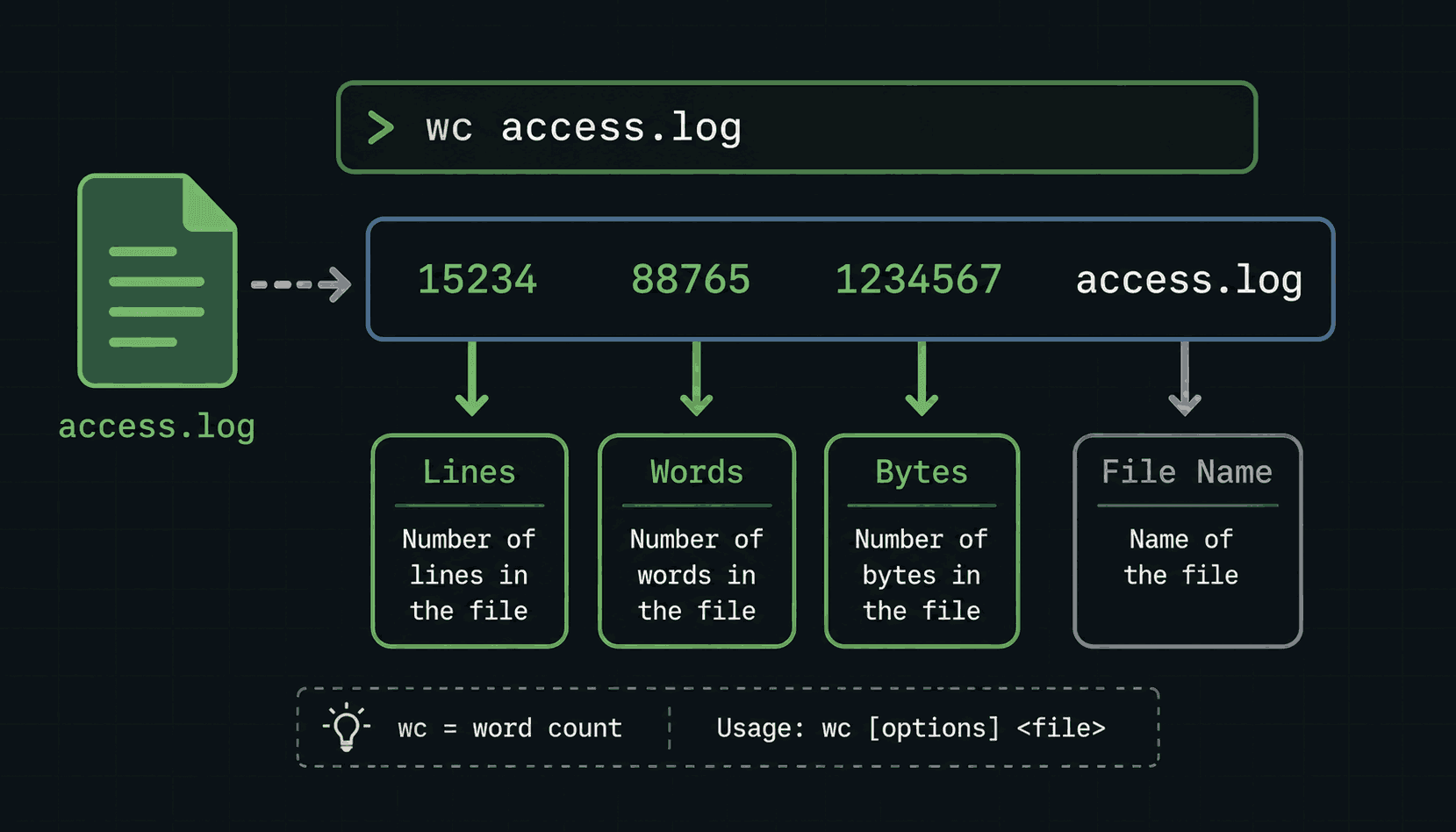
On my file that prints 12, 17 and 109 — twelve lines, seventeen words, one hundred and nine bytes. Most of the time you only want one of the three, and there is a flag for each:
wc -l notes.txt   # lines
wc -w notes.txt   # words
wc -c notes.txt   # bytes
wc -m notes.txt   # characters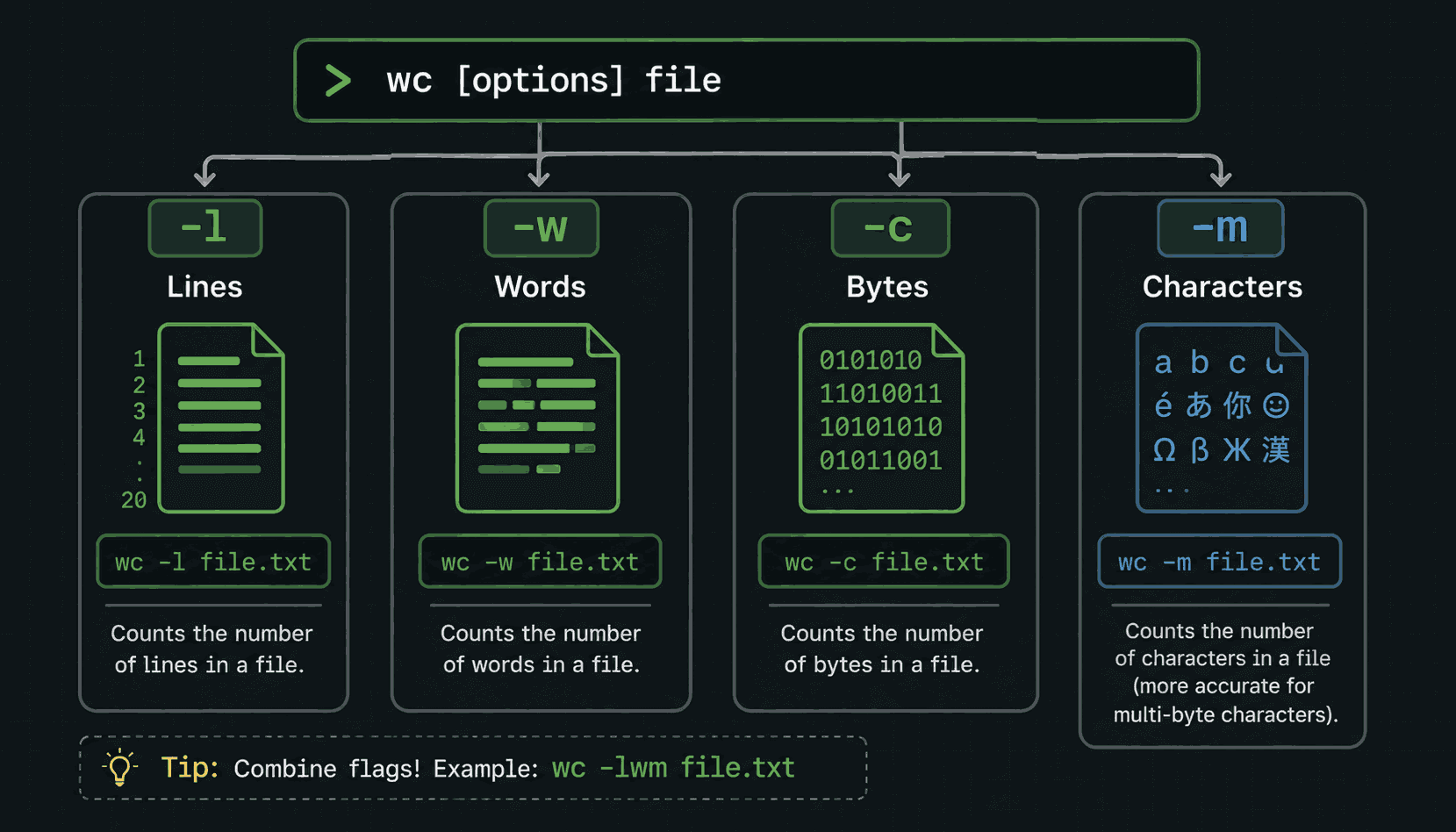
One honest detail the video glosses over: -c counts bytes and -m counts characters, and they only give the same number when the file is plain English. Add one emoji, or a name with an accent in it, and the byte count climbs while the character count does not. It will not matter for months, but when the two numbers disagree one day, this paragraph is why.
Of the four, -l is the one that earns a place in your fingers. Lines in a log file are events — one request, one error, one login per line. So counting lines is counting events, and that turns wc from a curiosity into a reporting tool.
The pipe: one command feeding the next
Before the next command, you need the one symbol this whole lesson turns on. The vertical bar — the pipe — takes the output of the command on its left and feeds it into the command on its right, instead of printing it to the screen:
grep -i error app.log | wc -lRead it left to right. grep finds every line containing the word error, and instead of showing them to you, it hands them to wc -l, which counts them. The screen shows a single number: how many errors are in the log. Two commands you already knew, one symbol between them, and suddenly you are answering questions instead of reading output.
Everything in the rest of this lesson works this way. The commands are small on purpose — each one does one job, and the pipe is how you snap them together.
sort and uniq: finding the duplicates
uniq collapses repeated lines. Run it on notes.txt and — if every line is different — it prints the file unchanged, which is exactly what happens in the video. Not very exciting. The excitement is on files that do have repeats, and here you need to know the one thing about uniq that catches everybody:
uniq only removes duplicates that are next to each other. If the same line appears at the top of a file and again at the bottom, uniq keeps both, because it only ever compares a line with the one directly before it. On a real log, duplicates are always scattered — so uniq on its own appears to do nothing, and beginners decide the command is broken.
The fix is the pipe you just learned. sort puts the lines in order, which drags every copy of a line together — and then uniq works perfectly:
sort notes.txt | uniqAnd now the version you will actually use at work. The -c flag makes uniq count each group instead of just collapsing it, and a second sort with -nr puts the biggest counts first:
sort access.log | uniq -c | sort -nr | headRead it left to right again: sort the log, collapse the repeats and count them, sort the counts numerically in reverse, show the top ten. That one line answers questions like which page gets hit the most, which IP address keeps coming back, and which error fires most often. It is the single most famous pipeline in Linux, and you now know every piece of it.
Cutting a slice out of a file with sed
sed is a huge tool — the name means stream editor, and whole books exist about it. This lesson takes just one trick from it, and it is the trick you will want first: printing a specific range of lines from a big file.
sed -n '10,20p' app.log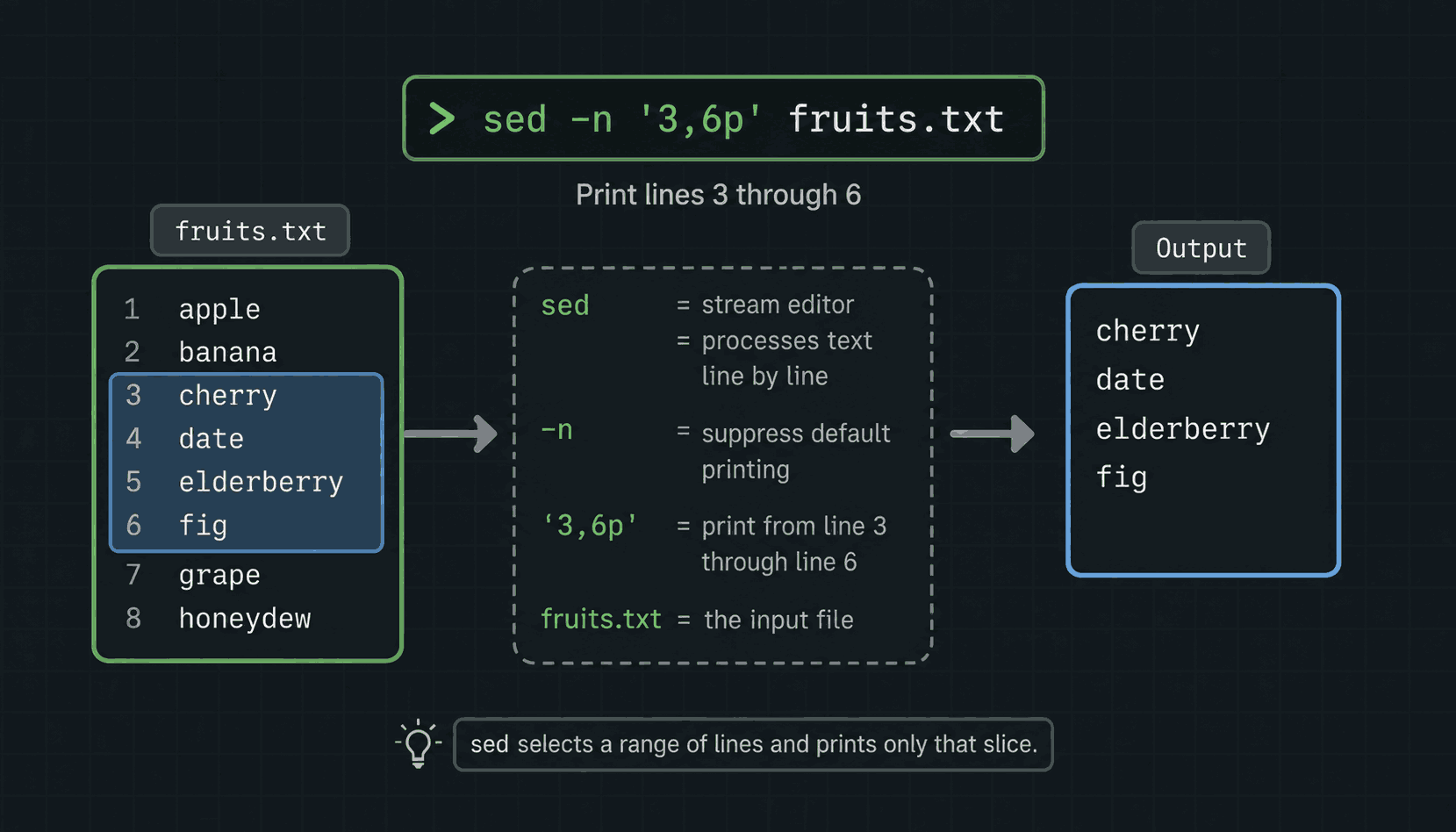
Each part has a job. By default sed prints every line it reads; -n switches that off. 10,20 is the range, and p says print — so the pair together means print only lines ten to twenty. Why does that matter? head gives you the top of a file and tail gives you the bottom, but when an error happened at line 84,200 of a log, this is the command that lets you read around it without opening the whole thing.
One teaser before moving on, because you will meet it everywhere: sed 's/old/new/' replaces text in a stream. Find-and-replace across a two-gigabyte file, no editor involved. We will use it properly in the bash scripting module — for now, just recognise it when you see it.
awk: columns and calculations
awk is the heavyweight of this lesson. It reads a file line by line, splits every line into fields wherever there is a space, and lets you do something with those fields — print them, filter them, or do arithmetic on them. The fields get automatic names: $1 is the first word on the line, $2 is the second, and so on.
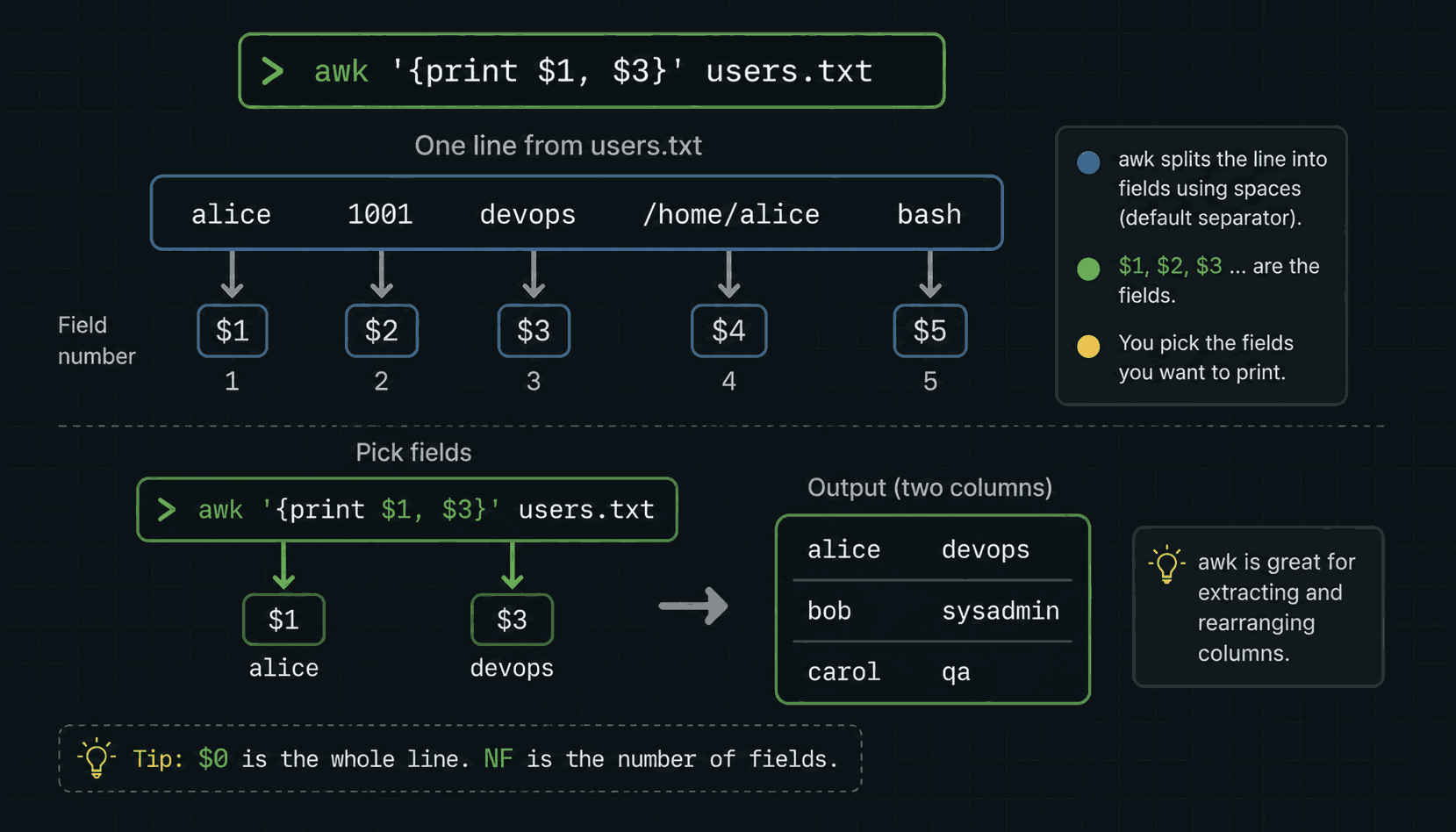
Simplest possible use — print the first word of every line:
awk '{print $1}' notes.txt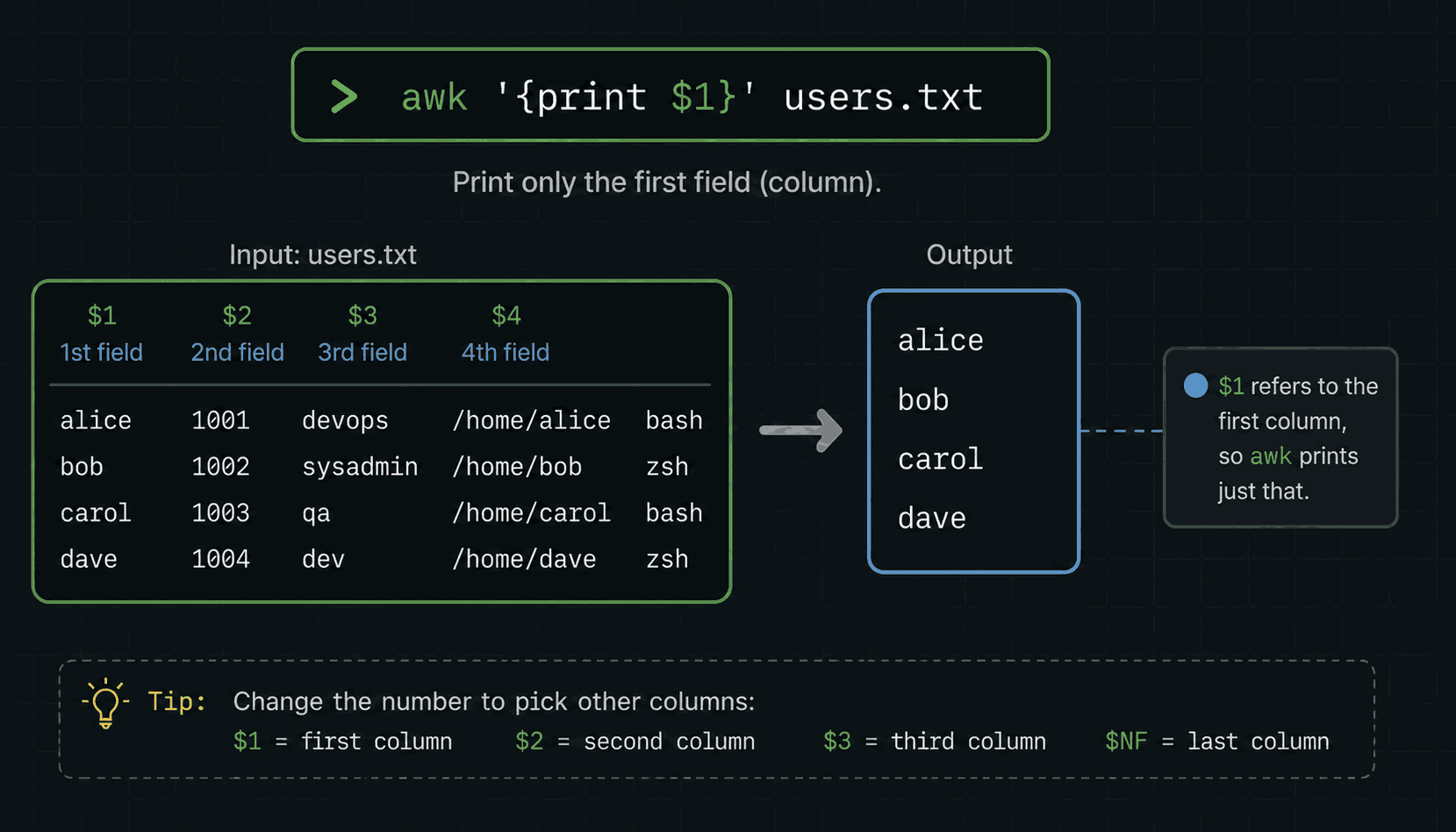
On notes.txt that prints the first word of each sentence, which is a party trick. On real files it is the job, because so much server output is columns: in an access log $1 is the client's IP address, in the output of ls -l $5 is the file size, in df -h $5 is how full each disk is. awk '{print $1}' is how you keep the column you care about and throw away the noise.
Now the part that surprises people: awk can do maths. Remember a.txt, the file of numbers from the start? This sums them:
awk '{sum += $1} END {print sum}' a.txt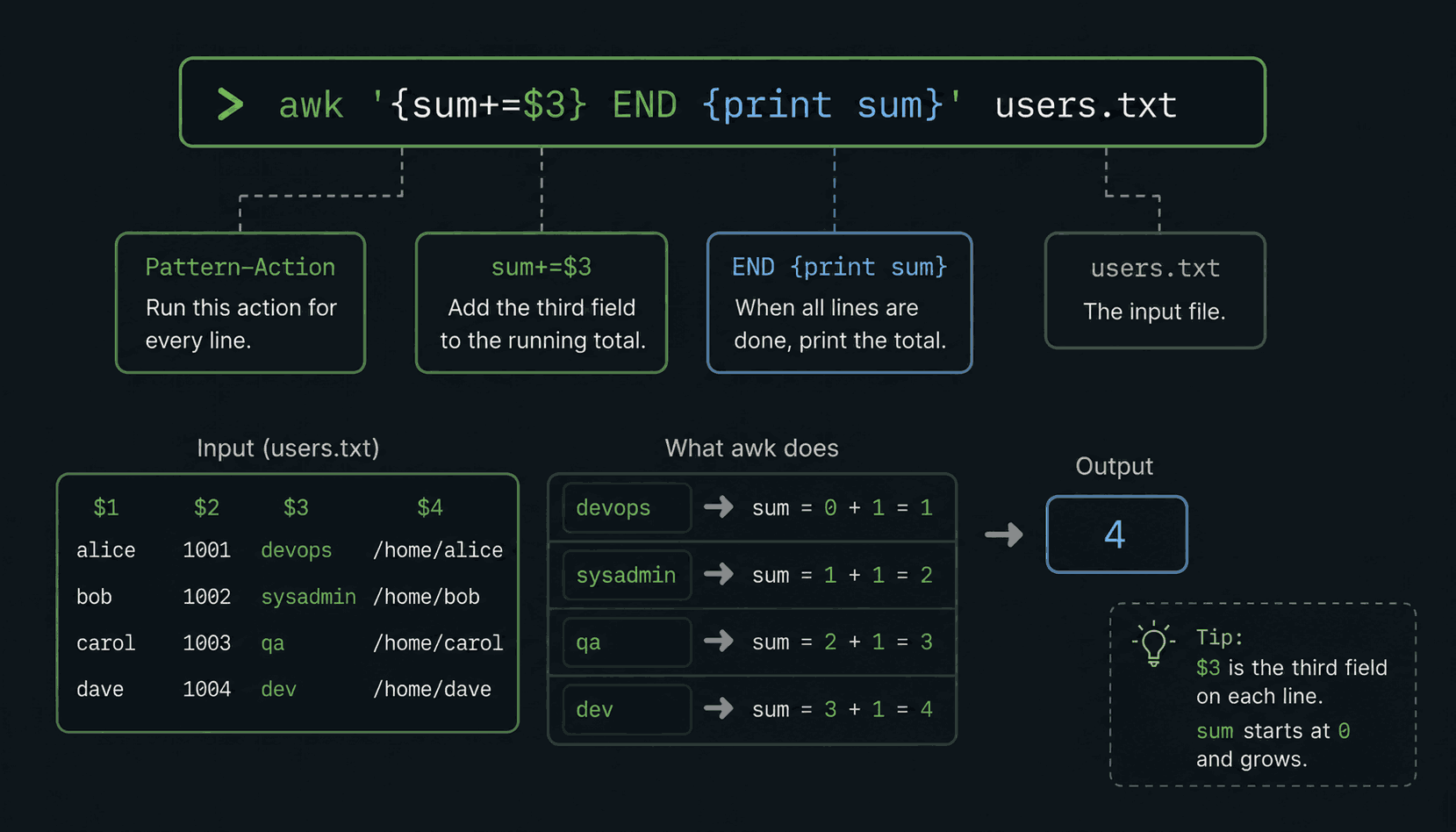
Two pieces. The first block, sum += $1, runs on every line: take the first field and add it to a running total. The END block runs once, after the last line, and prints the total. With 2, 3, 4 and 5 in the file, it prints 14. Run it on a file of words instead and it prints 0 — awk treats text as zero when you ask it to do arithmetic, which is exactly what happens in the video when the sum runs on notes.txt first.
Swap $1 for a different column and a.txt for a real file, and this exact shape totals bytes transferred from an access log or adds up a column in a report. One line, no spreadsheet.
Putting it all together
Here is the payoff, and the reason this lesson opened by promising magic. Say the site is erroring and someone asks: who is causing it? The log has two hundred thousand lines. You type one:
grep -i error app.log | awk '{print $1}' | sort | uniq -c | sort -nr | head- →grep -i error — keep only the lines with an error in them.
- →awk '{print $1}' — from each of those lines, keep just the IP address.
- →sort — put identical addresses next to each other.
- →uniq -c — collapse each group and count it.
- →sort -nr | head — biggest counts first, show the top ten.
The answer comes back in under a second: this IP address caused 4,000 of the errors, the next one caused 60, everyone else is noise. That is text processing. Not five commands — one sentence, read left to right, where every word does a job. When you can write that line without looking it up, the terminal has stopped being a place you type commands and become a place you ask questions.
Practise this properly
Fifteen minutes of typing beats an hour of reading. Open the Linux Playground or your own machine and run this from start to finish:
# build the two practice files
printf "keep learning Linux\nDevOps by Muh\nkeep learning Linux\nI will be at the top\n" > notes.txt
printf "2\n3\n4\n5\n" > a.txt

# count things
wc notes.txt
wc -l notes.txt

# see the uniq trap with your own eyes
uniq notes.txt              # the duplicate survives — it is not adjacent
sort notes.txt | uniq       # now it is gone
sort notes.txt | uniq -c    # now it is counted

# slice by line number
sed -n '2,3p' notes.txt

# columns and sums
awk '{print $1}' notes.txt
awk '{sum += $1} END {print sum}' a.txt

# the full pipeline, on your own file
sort notes.txt | uniq -c | sort -nr | head
The uniq pair in the middle is the most valuable moment in the block. Watch the duplicate line survive uniq on its own, then vanish after sort — thirty seconds of seeing it beats any amount of being told.
Every command in this lesson is written out in the course repo at github.com/codewithmuh/linux-course, so you can work through the list without scrubbing back through the video. The same notes are at devopsbymuh.com/learn/linux.
What's next
You can now count a file, group and count its duplicates, cut a slice out of the middle of it, pull one column out of it, and total a column of numbers — and chain all of that into one line. Here is the whole lesson in six:
- →wc counts — -l lines, -w words, -c bytes, -m characters. Lines are events, so wc -l is a reporting tool.
- →The pipe | feeds one command's output into the next. It is the whole reason these small commands add up to something big.
- →uniq only removes duplicates that are next to each other. sort first, always: sort file | uniq.
- →sort file | uniq -c | sort -nr is the most famous pipeline in Linux — what happens most often, biggest first.
- →sed -n '10,20p' prints only lines ten to twenty — how you read around line 84,200 of a log.
- →awk splits every line into $1, $2, $3… — print a column with '{print $1}', total one with '{sum += $1} END {print sum}'.

That closes module one — the basics are done. Part six opens module two, Linux Administration, with users and groups: who exists on a machine, who is allowed to do what, why every file has an owner, and the commands that control all of it. It is the foundation for permissions, sudo, and every "why can't I access this?" you will ever debug. See you there.
$ ./work-with-me.sh
Want this in your job, not just your notes?
I take engineers from wherever they are to hired-in-6-months — real projects, code reviews, and mock interviews. Or if you just need a hand shipping something to production, let's work together.
or subscribe on YouTube — free, forever.
$ subscribe --new-articles
Get new articles in your inbox
One email when a new hands-on guide goes live — Kubernetes, AWS, CI/CD, MLOps. No spam, unsubscribe anytime.